PC gaming might have a reputation for being loud and obnoxious at times, but gamers who’ve explored beyond the big esports and AAA games knows there’s subtlety and nuance too, and the same can be said for gaming hardware. Sure, Corsair sells giant flagship gaming rigs packed with the most powerful components possible. But, it also sells much more compact, quasi mini gaming PCs that are much more powerful than their appearance might suggest.
That’s where the Corsair One A600 fits in, and though 2026 prices mean it’s also several thousand dollars, you get a lot for your money. It’s an attractive, and impressively quiet system, with some neat little features that really help it stand out from the pack.
Purchasing GuideThe Corsair One A600 is available now starting at $4,399. That gets you an AMD Ryzen 9800X3D and an Nvidia RTX 5080, 64GB of RAM, and 4TB of SSD storage. This is the configuration I reviewed here, though you can upgrade the CPU to a 9900X3D on Corsair's website with four extra cores for an extra $100.
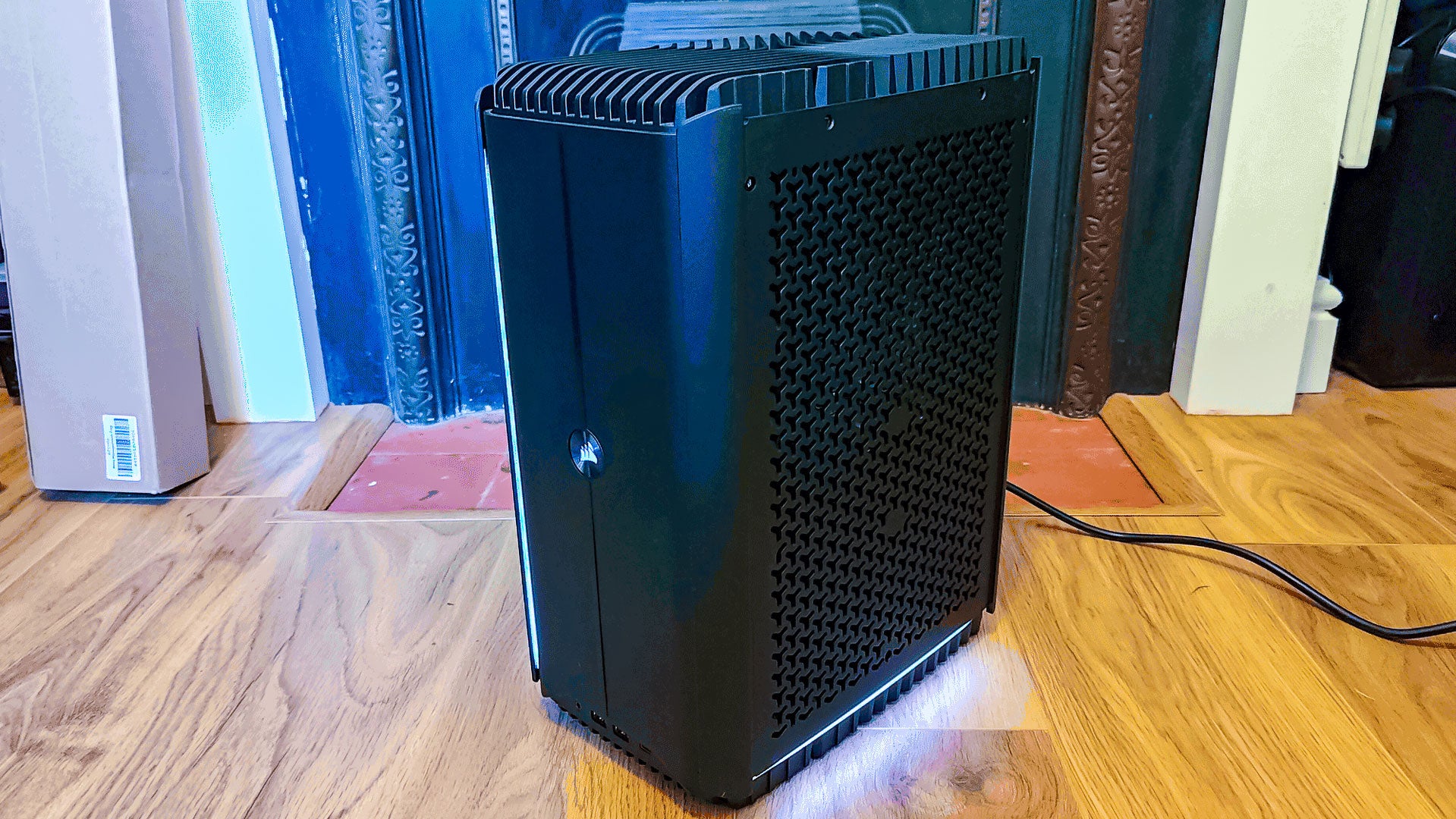
Design and FeaturesThe Corsair One A600’s case is compact and attractive, in the same way Apple’s Cheese Grater-style Mac Pro was. It is solid and well built, with some tasteful lighting effect bars along a few of its axes that don’t feel overwhelming the first time you turn it on.
Although taking off the magnetically-attached dust filters is super-easy – they’re , getting the side panels off proves far more difficult. They’re attached with only a couple of little screws, but they’re really little. I had to dig through my collection of screwdrivers to find one that would actually fit them, and even then getting them out wasn’t easy.
Once you do get them off, all you really see is the dual watercooling loops, and they’re seriously tight. I’m not even sure how long it would take me to take it apart and get at the motherboard, there are just so many sticker-covered screws in the way.
So, obviously, this isn’t a system Corsair expects you to maintain or easily upgrade yourself. This is a pre-built that’s designed to remain that way until you switch it out for something else. There’s nothing inherently wrong with that, but if you’re looking for a PC with more of a DIY-vibe, this is not it.
One little feature that I absolutely adore with the A600 is its rear I/O light. I’ve been building PCs for almost 30 years and it’s never not been a pain plugging cables into the right ports without some kind of external light source. The A600 comes with a touch and motion-activated spotlight that illuminates all the rear I/O connectors and their labels, making it much easier to plug everything in where it should be.
It’s a subtle tweak but one that’s super welcome. One of the best quality-of-life improvements on a desktop PC I’ve seen in quite some time.
The I/O is robust on the Corsair One A600, too. There are plenty of USB-A and USB-C ports, 5 Gigabit Ethernet and Wi-Fi 7 for ultra-fast networking, and the back even has easy-access BIOS flash and CMOS reset buttons. Considering how difficult it would be to get at the internal battery, that’s a really welcome addition.
SoftwareCredit to Corsair, it doesn’t fill your new gaming PC up with bloatware, only bundling two Corsair apps: the Corsair Diagnostics tool for troubleshooting issues and stress testing components, and the Corsair One Dashboard. The latter is a super-lean app that lets you adjust the lighting and cooling of the system, while giving you simple, clean readouts for CPU and GPU temperature, and the various fan speeds in the system.
There are plenty of better hardware monitoring apps out there, but for a simple, off-the-shelf solution that will help gamers make the most of their new Corsair PC, it’s all you need.
PerformanceAs you might expect with one of the best gaming CPU and GPU combinations, all chilled under watercooling, the Corsair One A600 is an excellent performer. Even at 4K with all the settings cranked, it manages 176 fps on average in Forza Horizon 5 with just DLSS upscaling giving it a boost. With frame generation it blew right through 200 fps and looks gorgeously smooth on a 240Hz OLED gaming monitor.
If you play more demanding games, this PC is more than up to the challenge. In Assassin’s Creed Shadows, 4K Ultra High settings proved no problem, with 64 fps average. In Metro Exodus: Enhanced Edition at 4K Extreme settings, it manages 66 fps average, even without any upscaling. It delivered much the same again in Cyberpunk 2077 when I turned on RT Overdrive – though tapping up frame generation lets the Corsair A600 boost even that demanding game to over 100 fps.
By contrast, Total War: Warhammer III was a breeze, sitting just under 100 fps even when conducting large and complex battles. If you’re an esports gamer, rest assured that mainstream games like Call of Duty Black Ops 7 run fantastically well, hitting 144 fps even when running at almost maximum settings.
I did hit a strange anomaly there, though, where turning on frame generation actually decreased FPS in that particular game, but considering frame gen tends to worsen input lag slightly, it’s probably something you’ll be turning off during intense multiplayer action anyway.
The most stark takeaway from all my gaming testing, though, was just how quiet this system was. The watercooling on the CPU and GPU, as well as the new thermal channel design Corsair has built into its custom case, go a long way to keeping noise levels down, even when the system is working hard. Anti-vibration mounts on the side panels further enhance the quiet gaming experience, making this a serene way to game.
It’s not often you can comfortably play top-tier AAA games at the highest of settings without resorting to headphones, but with the Corsair One A600 you absolutely can. I was testing it in the peak of a Spring heatwave, too, with ambient temperatures in my office around 26 degrees Celsius. The fact the GPU idles at less than 30 degrees even in that environment is impressive.
That was on the Balanced cooling mode, too. Switch to Quiet and the fans become basically inaudible until you do something demanding.
The A600 is more than ready to get some work done too. In the Procyon Office Productivity benchmark, it scores just shy of 9,300 points that’s more than the 9900X3D managed in our recent review. The eight cores are going to hold you back from the professional performance of the seriously top chips, but know that if you want to use this as a whisper-quiet work PC with the ability to rip high frame rates in your favorite games after hours, it’s more than up to the task.