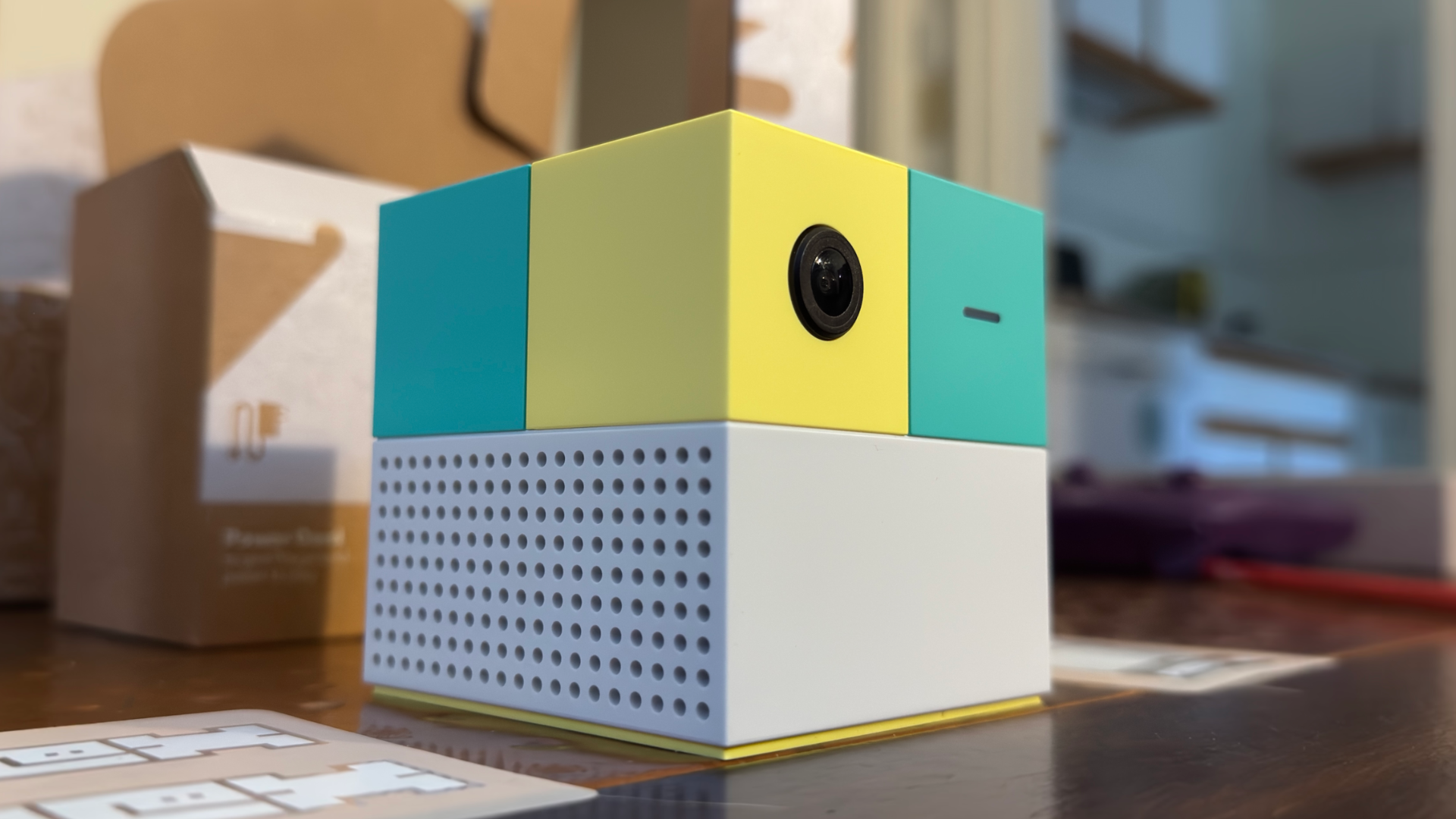
IGN snootily turned down an offer to review the Nex Playground around its 2023 release. And why not? It’s a casual games console from a company with no cachet in the space – a colorful little cube whose primary input method is your own body, via an ultra-wide camera lens on the front of the system.
And yet, like the Wii before it, this underestimated machine (scoffed by elite gaming media types everywhere!) managed to outsell Microsoft’s Xbox consoles over the 2025 holidays. Were we, the gaming media, wrong? So now, here I am as one of IGN’s child-having freelance writers, with a review of the little teal and yellow cube that could, the Nex Playground.
What You See Is What You GetEverything about the Nex Playground, from the gentle color palette of its cutesy, 3-inch-cubed form factor to its simplicity of setup and control, is aimed squarely at parents who desperately want their screen-addled kids to move. Its popularity shouldn’t surprise: it’s simple to use, there’s almost no setup or waiting for game installs and updates, and every single game on the console forces you to get up and do something, just the way so many games did on the Wii. (I, for one, remember hearing my mom, who hadn’t played a video game since the original Super Mario Bros. on the NES, holler “Steeeeeee-RIKE!” from the other room while she played Wii Sports bowling back in 2006. This is just a logical extension of that vibe.)
Setup is a breeze. The Nex Playground comes in a neatly organized package, with numbered boxes indicating the order you should take things in. There are just four pieces: the Playground itself, an HDMI cable, a USB-C power cable (with a little magnetic puck attached to it that serves as a slap-on physical camera shutter), and a small remote. The Playground is super small and light, but the cables that come with it are very flexible and don’t shove the console around while you’re hooking it up the way a stiffer cable might.
The first-time configuration is also quick, as long as you have your Wi-Fi password handy and don’t stop to read the lengthy privacy policy – which features a TL;DR at the top assuring you that the Nex Team, the folks behind the console, won’t sell your information. Next, you have to create a Nex Playground account and push through a splash screen offering you a subscription to the company’s $89 Play Pass plan. (We’ll get to that.) Then it gives you tips, like to not wear patterned clothing, or to set it up somewhere with a play area free of furniture you could bash into. Lastly, it’ll do a little test run to make sure where you’ve put it works for it.
Once you’re through setup, there isn’t much you can configure from the settings menu found at the top of the Playground’s home screen. You won’t find HDR toggles or refresh rate and resolution options; what you get, visually, is just what you get. There are some things you can change, though: you can hide certain games or adjust the time zone, and you can decide how long you want it to idle before going to sleep, to save your precious OLED TV. You can also have it turn on or off your TV, using HDMI-CEC, when it’s powered up or goes to sleep.
Things are similarly dull for the console’s specs, which are barely worth discussing, apart from the fact that it has 16GB of RAM, which is more than the 12GB inside the Nintendo Switch 2. That doesn’t actually mean anything about their relative performance, but it’s still a funny enough stat that I made sure to write it down. Either way, what it has is enough to run its Android-based Play OS, and that’s all it needs.
Purchasing GuideThe Nex Playground is available just about anywhere you might expect: Amazon, Target, Walmart, Best Buy and more all have the system in stock. You won’t need extra accessories, but you should assume it’s $89 higher than the initial $299 price tag, because it’s not very useful without a Nex Play Pass subscription.
Games and GameplayOkay, okay, the Nex Playground is technically a video game console, so let’s talk about the games. Its catalog of 50-plus games ranges from a tidy collection of thoughtful but simple originals (I use the term somewhat loosely) by Nex Team, some decent third party efforts, and rejiggered versions of casual smartphone games like Fruit Ninja that we’ve all been playing for well over a decade, to the sort of sloppy, licensed shovelware that plagued the Nintendo Wii, particularly near the end of its life.
You use the Playground’s remote for setup, choosing games, and sometimes navigating in-game menus, but it’s all motion control when it comes to actual gameplay. The system’s motion tracking, which follows 18 points on your body, worked very well, even in the cramped space of my tiny apartment living room. I wish it had some form of depth detection besides its camera and onboard NPU, though, because I definitely kicked the built-in cabinet along one wall more than once because the game put an object inside of it. That wasn’t an issue most of the time, but it would’ve been nice if the games adjusted to my surroundings more (or at all).
Without a subscription, you only get five games, including Fruit Ninja. If you want more – and after you’ve paid $300 for the dang thing, you will – your only choice is to shell out for Nex Team’s $89-per-year Play Pass subscription or a $49 3-month variant thereof. Doing so nets you around 50 more games, many of which are licensed from popular children’s programming, like Gabby’s Dollhouse: A-meow-zing Moves or Unicorn Academy: Friendship Adventures.
As for whether any of this is fun, well, I’ll say up-front that if the goal is to give your kids something they might think is fun but that gets them to move around, the Nex Playground works – at first. My 8-year-old loved Fruit Ninja, and Whac-A-Mole when I first hooked the system up. Unfortunately, the novelty wore thin quickly, and within a couple of days, I was alone in my quest to see if the Nex Playground is worth your time and money. It’s a bad sign that my child lost interest so quickly, but no two kids are the same, and yours might react differently.
So, how was the actual gameplay to me, a middle-aged man? Well, I guess I’ll tell you that through a series of mini-reviews of some of the few games I enjoyed.
Homerun HeroesThere’s not much to Homerun Heroes: Starstrikers. It’s a first-party online matchmaking arcade baseball game wherein you play against random others, trying to get more and better home runs than them. It’s actually fun, too. After lightly customizing your anime avatar, its gameplay involves assuming a batting pose – with a prop bat, if you want, apparently – in front of the Nex Playground, ready to swing your empty hands or prop bat when the time is right.
When the ball is pitched, a large circular outline appears onscreen and shrinks as it gets close. At the same time, an arrow underneath sweeps from pointing leftward to rightward, helping you to aim your hit – swing early, and it goes to the left; later, and it goes to the right. If you hit it just right, it’ll hit one of the multiplier bubbles floating over the stands. (The middle one is the highest, multiplying your score by five.)
You need to keep your swings low if you want to get that home run. Finally, if you don’t swing low enough, you won’t get a home run. I got the hang of this game almost immediately, and my scores dwarfed those of my opponents. Who I assume were all small children.
Fruit NinjaAh, yes, Fruit Ninja. It’s on everything. iPhones, the PS Vita, Xbox One, and even the Apple Vision Pro. I wasn’t surprised to find it here, and it’s pretty much the same game you’ve been playing for the last 16 years. (Yes, Fruit Ninja is almost old enough to vote in a US election. Which would be fraud! Arrest this man!)
Anyway, I’m not as good at Fruit Ninja as I was at Homerun Heroes. Onscreen, you’re represented by a shadowy, pixelated silhouette with arms that end in glowing stumps. As you flail around, slashes follow; your goal, as ever, is to use those slashes to cut fruit in half as it’s flung up from the bottom of the screen, while also avoiding the bombs occasionally mingled in with them. Because I own a Vision Pro, I might as well tell you that the Nex Playground version plays a little better than that one, except that, since you’re translating the movement of your arms to a 2D space instead of a 3D one, it’s very easy to accidentally cut fruit at the wrong time or trigger bombs.
But my kid, whose shoulder and neck aren’t currently recovering at a glacial pace from some unknown injury, loves Fruit Ninja. The game has a few modes of play, including Classic (three misses or a bomb and you’re out), Arcade (a timed, points-accrual fest), and Zen (in which you can’t lose and don’t have to deal with bombs if you don’t want to).
Bowling Strike!If you’ve played Wii Sports (or its Switch variant), you’ve played Bowling Strike! It’s got a similar vibe, with subdued muzak-style tunes and the ambient sounds of a bowling alley playing in the background. Bowling Strike! is a little easier to just pick up and play, though, partly since you’re not picking even picking up the remote, nor do you have to get down the slightly awkward Wii Sports timing of holding down the B button and letting it go at the right time – you just raise your arm when you’re ready to hold the ball, then swing it down, back, and then forward.
There’s a little of the subtlety of the Wii game, here. You can fling your ball at a left or right angle and even add spin, although I couldn’t get the hang of any of that. The game’s tutorial has you bend your arm left and right at the end of your follow-through to add spin, but it wasn’t very consistent, for me. I can’t say with full confidence that I don’t lack the coordination required to pull it off, though.
Still, my kid and I had a good time with Bowling Strike! I definitely prefer playing Nintendo Switch Sports or Wii Sports, but at least virtual bowling on the Nex Playground doesn’t carry with it the risk of an unintentionally-weaponized controller destroying my TV.
What Else Is There to Do?Nex Team included a handful of games that could appeal to older gamers, too. In its library, you’ll find a handful of fitness and dance games, one of which, Starri, you get for free and was both the most fun of the lot and the one that actually held my attention the longest. It’s clearly a simplified take on games like Beat Saber and Synth Riders, and gives you a choice of “Catch” or “Slash” when you start a session.
I’ve played a lot of Synth Riders, so I gave Catch a go, first. It’s a lot different from Synth Riders, actually – instead of catching balls that fly at you from a synthwave hellscape, you mostly reach for spinning boxes as they appear on screen. Sometimes, blue or orange diamonds float in from the side at the bottom of the screen, toward a half-blue, half-orange circle that you rotate so that the colors match up when the diamonds reach it.. Slash mode felt closer to what I understand Beat Saber to play like (I’ve never played it) – you flop your arms in the direction indicated by blue and orange arrows flying at you, and slash blue and orange bars, making sure all the while that you’re doing so with the right color (your left arm is blue and your right is orange).
Starri’s song library is mostly songs and artists I’ve never heard of, but Nex Team included a few fun licensed gets, like Shakira’s “Whenever Wherever” and the inevitable rickroll of Rick Astley’s “Never Gonna Give You Up.” The game was extremely forgiving when it came to timing and placing my hands in the right place, though, so it wasn’t hard to do well at.
The only other dance game is Barbie Dance Party, which I was, uh, terrible at. Its song list includes some from the excellent Barbie movie, but playing them involves mirroring the onscreen moves of a Barbie character. The Nex Playground is remarkably good at recognizing your motions in this of all games, so when I repeatedly failed to strike poses properly or at the right time, it didn’t count. The game didn’t pull punches when it came to what it wanted me to do. It’s got the makings for a great party game, though – it’s approachable, doesn’t really punish you for mistakes, and it makes you look like a total buffoon in front of your friends.
The fitness games are few and not all worth a go. Box Flow Fitness, for example, felt pretty disconnected from what I was actually doing, and its “trainer” was clearly (and annoyingly) voiced by an AI model. The goal is to punch flying objects with jabs, haymakers, and uppercuts, depending on the orientation of your target, and dodge angled bars by ducking or tilting your body. I’ve played the same game in VR, and hated it on the Nex Playground as much as I did on my Vision Pro.
Family Fitness Challenge was better. This game fills the screen with the video feed from the Nex Playground’s camera and an overlay, at the bottom, of objects you’re expected to kick, dodge, or jump over. This one was more engaging, and definitely got my heart rate up as I tried to jump over hurdles – kicking them off screen when my timing was bad – or return soccer balls, ideally at floating onscreen targets.
The Problem With the Nex PlaygroundI don’t mind the mostly shallow simplicity of the Nex Playground’s game catalog. Some of them are pretty fun, and I could see having a blast playing a number of them with friends. Unfortunately, the motion-based gaming will prove hard or impossible to play for some people who aren’t as mobile as I am, although to its credit, the system does at least have a filter for showing only games that use your upper-body exclusively, so people who rely on wheelchairs can still find something to do.
Where the Nex Playground really gets annoying is monetization. Apart from the base five games to start, you can’t access any of the rest of the library without Nex Team’s Play Pass subscription – there’s no option to buy individual games at all. I could stomach being able to sign up for a month at a time at a slightly higher rate, but the best the company offers, besides its $89 annual fee, is three months of access at $49. That’s a bonkers amount of money to pay for a library with so little to keep you coming back to it.
For any parents out there who’ve found their way to this review and are curious if the Nex Playground might give their kids a fun incentive to move around a little: Don’t buy it right away. Find a friend who already picked one up and schedule some time to go try it out. Really explore its library, ideally across multiple sessions. And if your kid likes it, consider how quickly in the past they’ve gotten over the novelty of a friend’s toy once they have one of their own. My own kid tried it at a friend’s, but having one in our own home almost immediately knocked the shine off of it, apparently.
There are reasons to like the Nex Playground – its $300 price tag is a lot easier to stomach than the (soon-to-be) $500 that a Nintendo Switch 2 costs, and you don’t have to buy extra controllers. But it’s also the same price as the original Switch, a system with a deep library of games, including plenty of those that use the Joy-Con controllers’ built-in motion controls, which are easy to find used, at a nice price. Plus, you don’t need a subscription to have a great time for many years with a Switch – you can buy the games you want, and they’re yours.