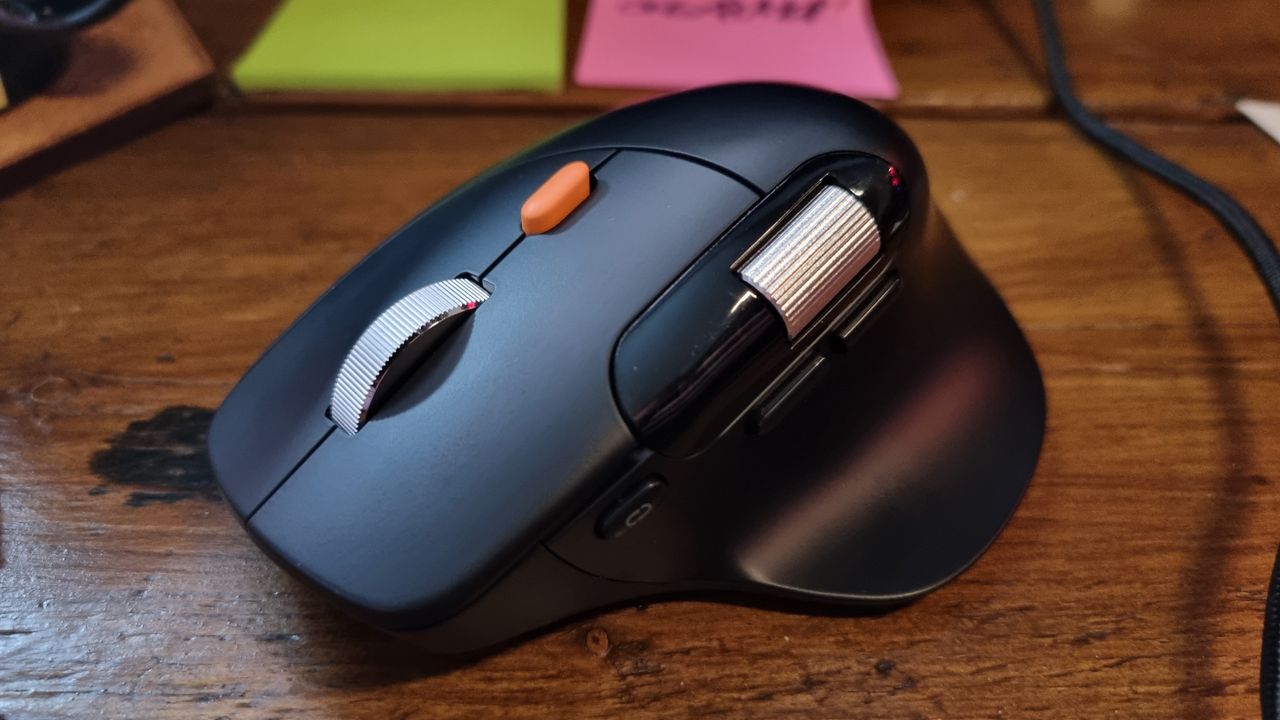
ProtoArc EM25 Ergonomic Mouse Review
If you're on the hunt for a budget-friendly ergonomic PC mouse, you might have already considered the Logitech MX Master 3S or the MX Master 4. Both have been staples in the productivity mouse space for many, offering a blend of comfort, precision, and refined design. However, if those models are too steep for your budget, the ProtoArc EM25 might catch your eye. It's a wireless ergonomic mouse that aims to deliver a similar experience to the Logitech models, but at a much lower price point.
The EM25 is clearly inspired by the MX Master line, with a similar chassis shape, an extended thumb rest, two scroll wheels (including one with a clutch), and quiet main switches. At first glance, it looks like a budget version of the Logitech mouse. But, in practice, it falls short of the mark. While it has the right features on paper, the controls, materials, and overall refinement are lacking. After using the EM25 for a few weeks, the experience was far from seamless, and I found myself frowning more than smiling.
A Solid Chassis, But Flawed Controls
The chassis of the EM25 is well-built, offering a sense of durability and stability. At $50/£29, it's a very reasonable price for a mouse with such a design. However, unless you're desperate for a Logitech-like mouse at a lower cost, there are more refined and better-performing options available. That said, the EM25 still holds value for those who can't justify the higher cost of Logitech's premium models.
If you're looking for a mouse that closely mirrors the feel and design of the MX Master but at a lower price, the EM25 could be a contender. But if you're after a pleasant user experience with smooth, responsive controls, the EM25 might not be the best choice. The main switches are quite good, offering a quiet, tactile click. However, other controls—like the scroll wheels and clutch mechanism—fall short of expectations.
A Clunky Scroll Wheel and Other Issues
The clutch-controlled scroll wheel is one of the standout features, but it's also one of the most problematic. The orange clutch button has an unusually long travel distance and offers a springy resistance that feels inconsistent. It engages and disengages the scroll wheel clutch at different points, making the overall experience less smooth. Unlike Logitech's magnetic system, which is seamless, the EM25 uses a mechanical clutch, which can feel clunky in use.
The horizontal scroll wheel is another feature worth mentioning. While it's a useful addition for productivity tasks, it's not as refined as its counterparts from Logitech. The wheel itself feels a bit stiff and unresponsive, which can slow down your workflow. The forward and back buttons on the left side of the mouse are also hollow and bendy, which might be a concern for those who use them frequently.
Connectivity and Design
The EM25 uses both 2.4 GHz wireless and Bluetooth connectivity, with a small dongle included for the 2.4 GHz option. The dongle can be accessed via a magnetically sealed hatch at the bottom of the mouse, which is a nice design detail. The polling rate is switchable, with a maximum of 1,000 Hz, and the sensor offers up to 8,000 DPI. The battery is an internal, rechargeable unit with a capacity of 500 mAh, though ProtoArc doesn’t provide specific battery life figures.
In terms of aesthetics, the EM25 is a clean, minimalist design that fits well with most desk setups. The weight is around 90 grams, making it significantly lighter than the Logitech MX Master 4, which is closer to 150 grams. While this makes the EM25 feel more lightweight and comfortable for long sessions, it's not optimized for gaming, which typically requires a heavier, more stable mouse.
Software and Customization
The software for the EM25 is accessible via a web app, which is a bit of a departure from traditional desktop applications. This approach simplifies setup and reduces the need for installation, but it lacks the depth and customization options of Logitech’s Logitech Options software. The EM25 allows for programmable buttons, which is a nice touch for users who want to customize their mouse for specific tasks.
Final Verdict
The ProtoArc EM25 is a budget-friendly ergonomic mouse that aims to mimic the feel of the Logitech MX Master series. It has the right design elements and a reasonable price point, but it falls short in execution. If you're in a pinch and need a cost-effective ergonomic mouse, the EM25 might be worth considering. However, if you're looking for a smooth, refined experience with top-notch controls, it's better to save up for the real deal.