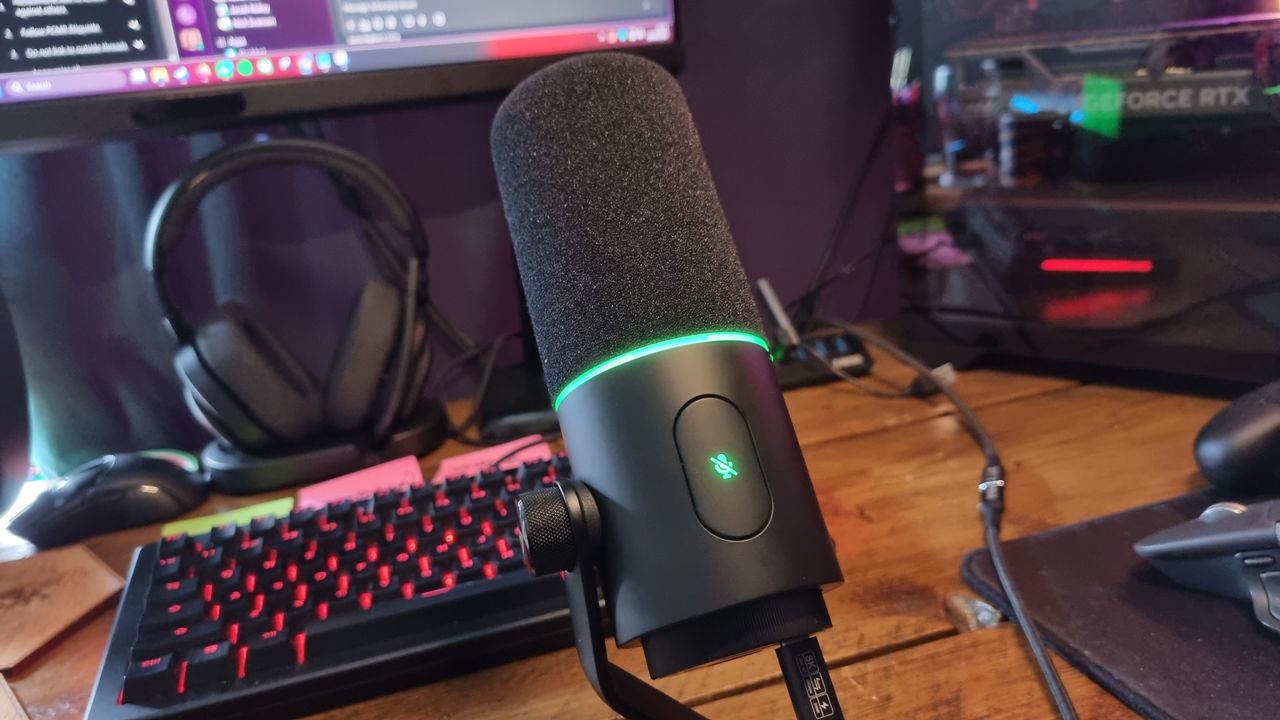
If you're in the market for a pricey, studio-like USB microphone for high-quality audio capture, you've probably considered one of Shure's offerings. You'd do well to look at the Shure MV7+, a dynamic podcast mic that's cemented itself into our best microphone for gaming guide for some time now. Razer, however, has come up with something that might not beat the MV7+ outright, but certainly gives it something to think about.
It's called the Razer Seiren V3 Pro, and it retails for $250/£250. That's around $40-45 cheaper than the MV7+ at current prices, and while the V3 Pro isn't quite able to deliver the same ultra-refined, smooth vocal capture, it's got a lot going for it in terms of sheer flexibility.
It's more usable in a desktop position, for a start. You also get access to an AI noise reduction feature, a noise gate, a compressor, and a parametric EQ with plenty of well-tuned presets. There's also an auto setup feature, which I had some real trouble with. I'd say it was better ignored, or if needed, used to provide a rough baseline you can tweak for yourself later.
Still, many great vocal tones can be pulled from this particular unit—albeit with a touch of fiddling. It's got a tendency towards a detailed capture, but still reveals the odd rough edge that takes a little tweaking to filter out. But with the flexibility on offer here, the V3 Pro makes a good case for itself as a versatile vocal mic.
It's not quite on the Shure's level when it comes to finding that podcast-like, streaming friendly, studio-grade sound. But it's a jack-of-all-trades with a lot to offer, provided you're prepared to put a little time into it.
Buy if...✅ You want something streamer-friendly: The Seiren V3 Pro is a good-looking microphone with all the bells and audio whistles a streamer might want—and likely some podcasters, too.
✅ You want powerful software: The V3 Pro's Synapse integration allows for a lot of tweaking while still remaining accessible enough for beginners.
❌ You're relying on the auto setup feature: This mic does its best to set itself up on first boot, but the results can vary wildly. Be prepared to take a dive into the settings to fix its mistakes.
❌ You're on a budget: If all you need is a simple mic for the odd meeting or game chat, the Seiren V3 Pro is definitely overkill.
The Razer Seiren V3 Pro is a dynamic microphone, which means it's not as sensitive as a traditional desktop condenser mic. You'll need to move some air in the near vicinity to get the most out of it, although unlike the Shure MV7+, Razer has included a screw-in stand base to allow it to function as a desktop mic straight from the box.
It makes use of a 30 mm dynamic capsule with a frequency response of 50 - 16,000 Hz, and supports audio capture up to a 32-bit/96 kHz resolution, along with 32-bit float support through a Razer Synapse setting. This format technically allows for higher peaks without clipping or distortion.
Do you need 32-bit float support? Probably not. But Razer says it's perfect for streamers who speak quietly, and then suddenly yell at… I don't know, something jumping out of a cupboard in a horror game.
FutureFutureFutureThe Seiren V3 Pro is a dual-connectivity mic, with an XLR socket and USB Type-C port integrated into the bottom of the chassis, although you can't use both at once. In terms of controls, you get a manual gain control wheel on the bottom, and a large tap-to-mute button on the top.
Around the bottom of the foam pop filter is a tastefully small ring of RGB Chroma lighting, and the microphone itself is attached to an adjustable one-sided arm with a ⅝-inch boom arm socket in the bottom.
It's a good-looking, professional-feeling object, with a chunky, overbuilt design that underscores its "Pro" moniker. If I had one ergonomic critique, I'd say the pop filter is a touch loose in terms of fit, which means it has a tendency to slip slightly out of position at certain angles. Mind you, some Shure mics have the same problem, and I've not had it fall off entirely under testing, so it's not a huge deal.
Razer Seiren V3 Pro sound(Image credit: Future)I'll go more into the Seiren V3 Pro's auto setup option in the software section below, but as a quick note: It's far from perfect. However, the microphone itself is a well-equipped unit, and the manual software options work fairly well. The clips below were recorded with custom settings, rather than auto setup:
Desktop positionIn a desktop position, it's also rather quiet—which is to be expected from a dynamic microphone. I had to boost the gain settings to record the clip above, with a dose of compression and some AI noise cancelling to even out the volume and remove some unwanted nasties. The noise gate is a touch aggressive, which means I had to set it fairly low and allow some background hiss to remain in the final desktop-position take.
Close-up positionStill, Razer advertises this mic as delivering "studio sound", and while it takes a little fiddling in the software to get there, the close-up results sound very good indeed. The desktop position audio is also perfectly decent, if a touch noisy. It can do both, but being a dynamic microphone, it still likes being close to your lips for those toasty tones.
I'd say what we're dealing with here is a good-quality capsule that leans towards detail, with the EQ presets and software features richening things up. There's nothing wrong with that, but the Shure MV7+ sounds like a higher-quality unit from the get-go.
Razer Seiren V3 Pro software(Image credit: Razer)Razer has made a pretty big deal of this mic's auto-setup feature, so I was curious to see what it made of my quiet living room in a desktop position. Upon connecting the mic for the first time, Synapse asks you to speak normally into the microphone to record a test clip, before taking a sample of the room ambience to adjust the noise-cancelling features.
It then asks you to pick a primary purpose, such as streaming, podcasting, gaming capture, etc, before adjusting all of its own settings.
Which, in my case, led to an overly-aggressive noise gate that clipped my voice so badly that every other word was missed out in my first test clip. Oh dear. Trying again, it seems that the auto setup gets very confused with my particular use case, with the mic placed 10 -15 cm away from my mouth next to a window with occasional traffic.
Desktop position, auto settingsDespite having a very good compressor, AI noise suppression, and the aforementioned noise gate to play with, the auto setup struggled to find a good gain level, set the gate far too aggressively, and chose to ignore the compressor and AI noise suppression sliders entirely. Which again resulted in an uneven sound with plenty of words being cut off.
Close-up, auto settingsStill, with a bit of tweaking (essentially, I fiddled with the noise gate settings until it stopped cutting off the start of my words, gave it a gain boost, and compensated with AI noise suppression and a touch of compression), the Razer captures a rich vocal tone overall, as you can hear in the Sound section above.
However, the auto setup feature regularly makes mistakes in terms of its settings choices, which is likely to leave many users scratching their heads. It's a nice idea on paper, but in practice, I'd leave it well alone.
(Image credit: Razer)Top marks, however, go to the parametric EQ presets. I leapt straight to the "podcast" setting and was presented with an EQ curve that looked very familiar. I've done some podcast audio engineering in a previous life, and Razer's EQ curve looks… well, it looks very much like one of mine. Which is obviously the best podcast EQ you'll ever find, of course.
You can tweak the EQ around to your heart's content, but each of Razer's default options is a pretty good start. I've noticed a tendency to boost the bass frequencies in each preset with a sharp drop-off in terms of sub-bass, which is often good practice when hunting for a 'rich' sound. Still, as noted above, it's the EQ that's doing a lot of the work on what is otherwise a good, but not mind-blowing capsule.
But overall? The software design is fairly straightforward, as long as you're prepared to do some of the work yourself. I wish the auto setup was better when it comes to some of its settings choices, but there are enough options here to easily correct its mistakes.
Razer Seiren V3 Pro value(Image credit: Future)At $250, the Razer Seiren V3 Pro is far from cheap. However, it is cheap-er than the Shure MV7+, and finds itself shooting for the same target market. Namely, those who want a near-studio-level microphone for semi-pro streaming audio.
The problem is, the Shure microphone is simply better at performing that goal, at least in a close-up position. While it's a chonkier unit and less versatile, its key selling point is the plug-and-play nature of both its software and its internal hardware.
I've spent half a lifetime screwing around with audio settings, and the Shure MV7+ is so darn good at finding a professional sound with the minimum of tweaks, I consider it the be-all and end-all of semi-pro vocal mics. I had hoped that the Razer's auto-setup feature would close that gap, but unfortunately it had me hunting through the settings at multiple points during testing.
(Image credit: Future)That being said, the Seiren V3 Pro is a very capable microphone once you've tweaked it for yourself. It also looks great and has a chassis design that oozes refinement. And, despite its flaws, I think its sonic characteristics (after the requisite effort) make it worth considering. Particularly if you plan on mixing things up between desktop and close-up positions.
Just leave the auto setup well alone, yes?