How to Share a Link to a Particular Phrase
The act of sharing a specific line of text from a webpage has become increasingly precise, thanks to a hidden but powerful feature in modern web browsers. Text fragment links allow users to generate a direct link that highlights that exact phrase when someone else opens it. This subtle but significant improvement in digital communication is available without any extra software, and it changes the way people share ideas online.
Creating a Link That Highlights Specific Text
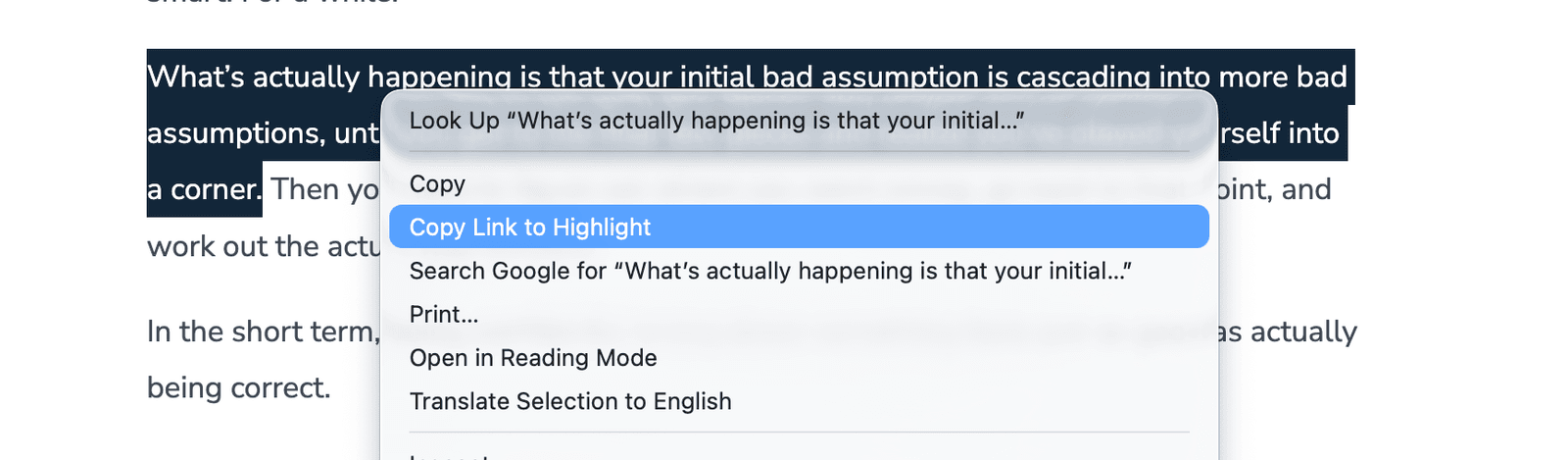
The process is nearly identical across major browsers like Chrome, Firefox, and Safari. Start by selecting the text you want to highlight. Right-click the selected text and choose the option that says Copy Link to Highlight (Chrome and Firefox) or Copy Link with Highlight (Safari). Once copied, the link can be sent via email, messaging app, or social media. When the recipient opens it, the browser automatically scrolls to the highlighted text and displays it in a distinct color, usually purple or yellow, depending on the browser.
This method is particularly useful in several scenarios:
- Clarifying a point: When you want to show someone a specific piece of evidence rather than explain it.
- Settling disputes: Directly sharing a relevant excerpt can be more persuasive than a paraphrased argument.
- Highlighting humor: If a joke or witty line stood out, you can share it exactly as it appears.
The Technology Behind Text Fragment Links
The feature relies on a web standard known as Text fragments, which has been supported by browsers for years. When you generate a link that highlights a particular phrase, the URL contains a special identifier that tells the browser where to locate the text. This identifier can be as simple as the exact text itself or a reference to a specific range of characters on the page.
For example, a link might look like this: https://example.com/#text=highlighted_phrase. When opened, the browser will navigate to that page and highlight the matching text. For longer selections, the URL may include a range, such as #text=highlighted_phrase_start_to_end.
There are limitations to the feature, however. It doesn't work on pages behind paywalls or in PDF files, even when they're viewed in the browser. Additionally, some websites may disable the functionality for security or formatting reasons. Still, in most cases, this method is far more efficient and accurate than sharing screenshots or lengthy excerpts.
A More Precise Way to Communicate
The ability to share links that highlight specific text is a small but impactful enhancement to how information is exchanged online. It aligns with the growing demand for clarity and context in digital conversations, particularly in an age where misinformation is prevalent. Rather than relying on static images or paraphrasing, users can now point others directly to the source of a claim or idea.
As this feature continues to be used more widely, it may encourage content creators and developers to optimize their sites for text fragment support. While not every website currently takes full advantage of it, the underlying technology is already in place and ready to be leveraged for better communication. In the future, this could lead to more intuitive ways of navigating and interacting with online content.