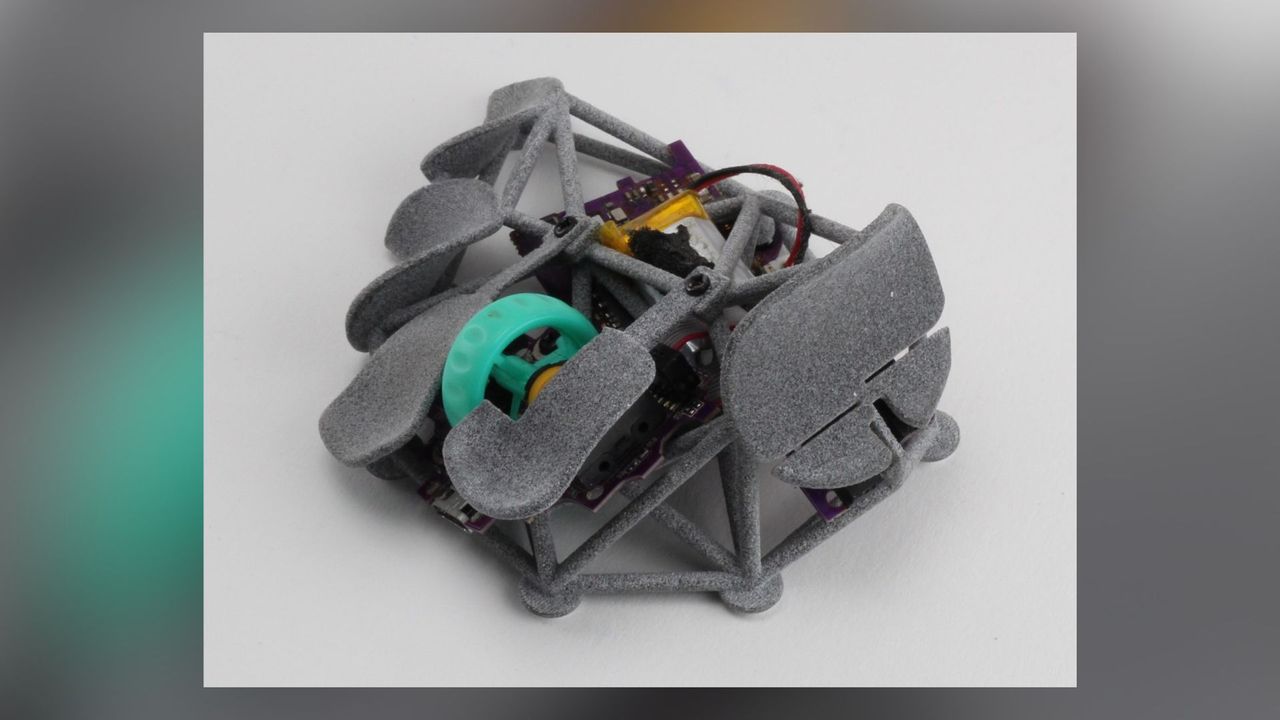
I love a strange keyboard, or a weird controller (here's looking at you Victrix Pro BFG), but I've discovered I might be a bit more traditional about my gaming mouse preferences, if this DIY fingertip mouse is anything to go on. To be fair, it could be the whole 'spider-like mouse where you can see its internals' thing that's putting me off.
X user Pseudoku recently took to the social media platform to show off their mouse, or as one comment argues, spider. Effectively, it's a handful of platforms made out of nylon on top of a traditional mouse's internals, so you can rest your fingers. It doesn't look particularly uncomfortable, but it does seem like resting your palm would be tough, and may jam into a pointy bit.
Have been happily using mine for over a year and now that the hype is dead, I'm open sourcing it on my GitHub. Made a few adjustments on the model, edited my codes to more human legible form. pic.twitter.com/q6ndQ3SDDdJune 11, 2026
Luckily for you, if you want to build one for yourself, Psuedoku has shared the mouse on their GitHub. You can download the STL files to 3D print the shell and paddles yourself, or you can grab the SCAD file and edit it to your proportions. Should you have a particularly big or small hand, it might need some adjusting.
It even comes with step-by-step instructions on where to place the internals, how to attach the different 3D-printed parts, and where to place the battery at the end. It looks pretty good, despite how weird it is.
The downside is that the instruction requires a whole other mouse to get this spider-like one working. Psuedoku disassembled an HSK Pro (presumably the G-Wolves HSK Pro) to get its buttons, battery, and sensor, then attached all the parts to the side, Frankenstein's Monster style. Luckily, it is alive and has a pretty killer sensor too.
The G-Wolves HSK Pro seems to be a very specific choice, because the mouse is comically small. It's effectively just the top half of a gaming mouse, which gives it a 26.8 g weight, despite its 8,000 Hz sensor. That little size presumably makes for a good base because of how centralised its internals are. You have one big clump of components that everything else gets built around.
We've tried fingertip keypads before (and really quite liked them), and part of the joy of them is that those fingertip buttons give you access to quick controls. In this case, the standard left and right clicks work, as well as the side buttons, but the other fingertip mounts appear to be purely for you to place your fingers. Whether or not that gets you more precise controls is anyone's guess, and likely highly subjective, but I'm not brave enough to tear apart my mouse to give it a try.