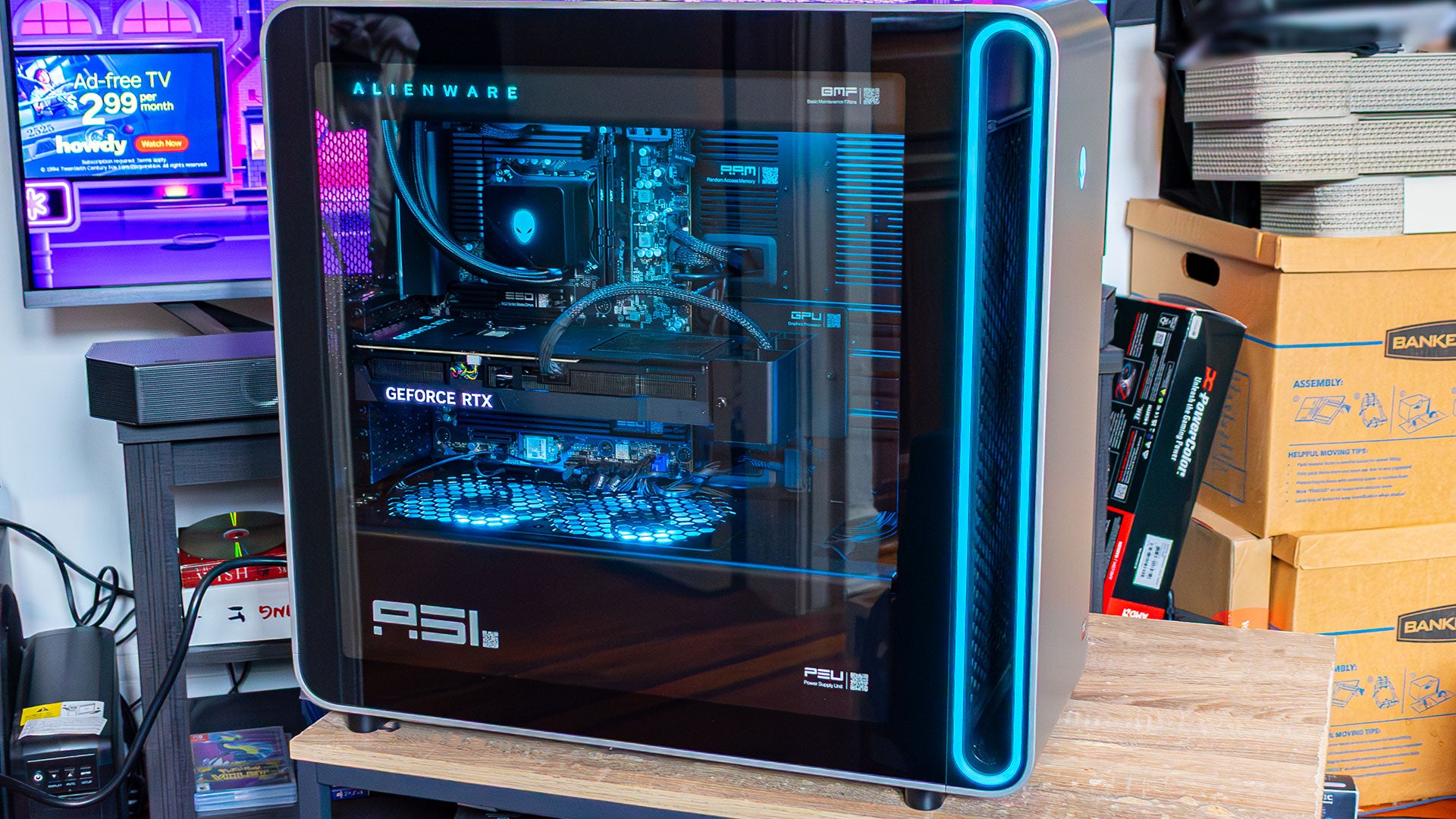
Hardware Specs for the Alienware Area-51 Gaming PC Review
Twenty-five years ago, Alienware was synonymous with high-end gaming PCs, creating the RGB-heavy aesthetic we know today. While the market is now crowded with competitors, this Alienware Area-51 Gaming PC Review looks at whether the brand can reclaim its legendary status. This new tower is far more adventurous than recent conservative designs, though it occasionally feels like a boardroom-designed piece of tech meant to look "cool" in a post-Jony Ive world.
The Alienware Area-51 is Alienware’s top-end rig, and the starting configuration I reviewed costs $3,849. If you want to push the limits of performance, you can scale up significantly.
Here are the primary configurations available:
- Base Model ($3,849): AMD Ryzen 7 9800X3D, RTX 5080, 32GB RAM, and a 1TB SSD.
- High-End Model ($6,349): AMD Ryzen 9 9950X3D, RTX 5090, 64GB RAM, and a 4TB SSD.
Design and Build Quality
The new Area-51 is massive. It stands nearly as tall as a desk and weighs enough to make a third-floor walkup a serious challenge. The tower measures 22.4 inches tall, 24 inches deep, and 9 inches wide, with a maximum weight of approximately 76lbs.
The chassis is primarily metal with a giant glass side panel. Alienware has implemented a mechanical system that uses a twisting dial to unlock the PC, followed by buttons on either side to open it. While this aims for toolless upgrades, you will still need a Philips-head screwdriver to secure the initial locking screw.
Once inside, the level of detail is impressive. Alienware has included QR codes on nearly every component that link to part-swapping guides. This is an excellent way to demystify the system for users who aren't familiar with building their own PCs.
Cooling and Connectivity
The top of the chassis features a cool honeycomb ventilation design. In the entry-level model, this houses a 360mm AIO radiator. The airflow is further supported by two 120mm fans mounted above the power supply and two 240mm intake fans at the front.
Front-facing connectivity includes:
- Two USB-A ports
- Two USB-C ports
- One 3.5mm headphone jack
- One 3.5mm microphone jack
The aesthetics are heavily driven by RGB lighting. The Alienware logo acts as a power button, and an RGB strip surrounds the front alcove. The fans, graphics card, and CPU block all feature customizable lighting that defaults to a blue hue reminiscent of Glacier Freeze Gatorade.
Software and Features
Because Alienware is owned by Dell, you will have to contend with some pre-installed software. While not as "bloat-y" as other mainstream prebuilts, the Alienware Command Center can be quite intrusive with constant notifications. I recommend muting these alerts immediately.
The software allows you to manage performance profiles and lighting configurations effectively. However, other tools like Alienware Arena are less impressive, and most users will likely prefer sticking to Steam or GOG Galaxy.
The system also includes a default RAID configuration tool. While useful for some, it is unnecessary for the single-SSD model I reviewed. Aside from that, the standard Dell suite of update tools remains present, though they do not run in the background.