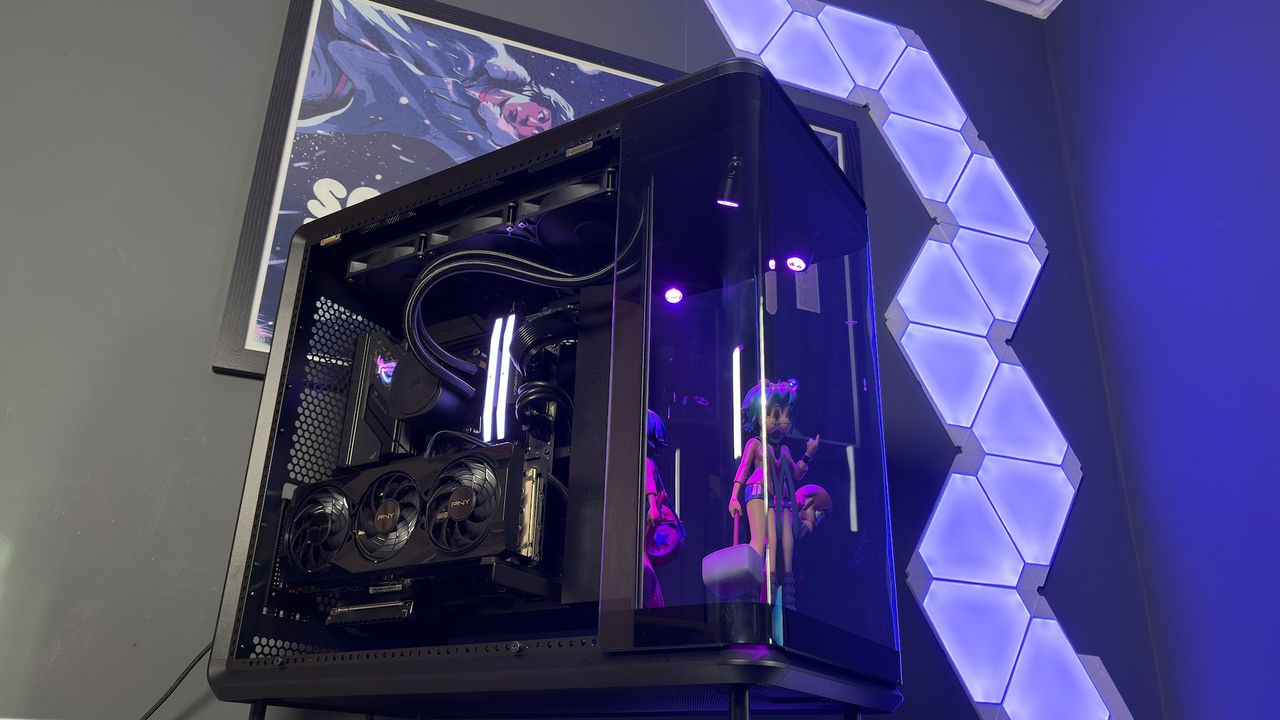
If you are the type of enthusiast who wonders how to achieve that custom anime paint job on a car, the Cooler Master MasterFrame 360 Panorama might be your perfect match. This chassis is fundamentally about putting your personality on display, transforming a standard PC build into a centerpiece for your room.
The MasterFrame 360 Panorama achieves this through a unique architectural design featuring three tempered glass panels. There is one on each side, plus a curved panel that hugs the front of the case. Behind this front glass sits a dedicated "stage." While small, this area features a mirrored backdrop and two adjustable spotlights, designed to turn a single figure into the focal point of your entire build.
Whether it is a model of a 1988 Lamborghini Countach, Feathers McGraw from Wallace & Gromit, or a character from your favorite anime, the case invites you to curate a museum inside your PC. I recently placed a Romona Flowers figure from the Scott Pilgrim graphic novels in the display area, which matched a framed poster behind my desk. The only downside was that the figure was slightly too short to fully utilize the vertical space.
It is important to note that this case is enormous. Measuring 585 x 550 x 292 mm, it is both tall and wide. This generous footprint leaves ample room for large display items, ideally figures up to 32 cm in height.
Design and Display Features
The MasterFrame 360 Panorama is not a one-size-fits-all proposition. Cooler Master offers several configurations for the front display compartment, each catering to different aesthetic preferences:
- Mirror Panel ($222): The standard version reviewed here, featuring a reflective backdrop for your display.
- Closed Compartment ($200): Similar to the mirror version but seals the front display off from the rest of the case interior.
- LCD Screen ($300): The premium option that replaces the mirror with a digital display for dynamic content.
Whatever option you choose, the display area is well-lit by twin spotlights mounted to the top of the space. These lights are easily adjusted via ball joints, allowing for 360-degree movement to highlight your figures from any angle. Each spotlight has its own ARGB connection, which can be combined into a single source in your motherboard’s lighting software or run independently.
While the front stage gets all the attention, the rest of the case is designed to keep functional components out of sight. The side panels feature a light tint to help obscure cables and connectors, working in tandem with the case’s unconventional cable management system.
Cable Management and Interior Layout
The MasterFrame 360 utilizes a distinct internal layout where the actual PC hardware sits on a tray suspended between the top and bottom of the case. This design prioritizes visibility from the rear, but it also demands a cleaner approach to wiring than traditional mid-towers.
Most cables are routed beneath a metal cover on the right side, held in place by six rubber fittings. This cover can be removed with a light pull, revealing the path cables take through a removable SSD cage, which accommodates two 2.5-inch drives.
Because the rear of the case is visible through a tempered glass side panel, the back must be tidy. You cannot simply hide a mess behind the glass. However, Cooler Master has included specific plates to affix atop the cables and power supply. These covers almost entirely eliminate the need for zip-ties, provided you keep the cables roughly under the covers before securing the glass panel.
**Cooler Master MasterFrame 360 Panorama Specs** * **Dimensions:** 585 x 550 x 292 mm * **Motherboard Support:** ATX, Micro-ATX, Mini-ITX * **Max GPU Size:** 430 mm * **Max CPU Cooler Size:** 145 mm * **Storage:** 1x HDD or 2x SSD bays * **Front I/O:** 1x USB 3.2 Gen2x2 (Type-C), 2x USB 3.2 Gen1 (Type-A), 3.5 mm audio jack * **Fan Support:** 12x 120 mm fans (or 4x 140/180/200 mm) * **Cooler Support:** Up to 360 mm AIO * **Extra Features:** VGPU mounting with PCIe 5.0 riser cable * **Price:** $222 (Mirror, Open) | $200 (Mirror, Closed) | $300 (LCD)One oddity in the design is the power supply placement. The largest cable cover includes a cutout for the PSU fan, which can be adjusted for larger models. However, upon reinstalling the tempered glass side panel, it becomes clear that the PSU is largely cut off from fresh airflow. This is an unusual decision for a chassis that emphasizes airflow and cooling potential.
Cooling and Expansion Flexibility
The case does not come with fans included, but it offers extensive options for cooling enthusiasts. There is space for six 120 mm fans in the top and six in the bottom. The chassis uses an adjustable rail system for its outer frame, allowing the fan brackets to move. This flexibility lets you accommodate up to two 140 mm, 180 mm, or 200 mm fans if required.
I opted to top and tail the case with 3x Corsair RS120 fans and a Corsair Nautilus 360 RS AIO. The adjustable rail system made this configuration straightforward.
The MasterFrame 360’s flexibility suggests it could easily support a custom water cooling loop with minimal to no modifications. The open design and robust mounting options cater to builders who want to showcase their hardware rather than hide it.
Verdict
The Cooler Master MasterFrame 360 Panorama is a niche product that excels at a specific goal: displaying your personality through your PC build. If you have a collection of figures, models, or memorabilia, this case provides a curated stage for them, enhanced by adjustable lighting and a sleek glass design.
Buy if:
- You have a collection of figures: If you want to represent your favorite anime, gaming, or pop culture interests, this case offers a dedicated, illuminated space to do so. Just remember, you are generally limited to one main display item due to the size constraints.
Don't buy if:
- You prioritize maximum cooling efficiency: While the case supports a vast number of fans, you must purchase them separately. Additionally, the PSU’s airflow is somewhat restricted by the design, which may be a concern for high-wattage builds.