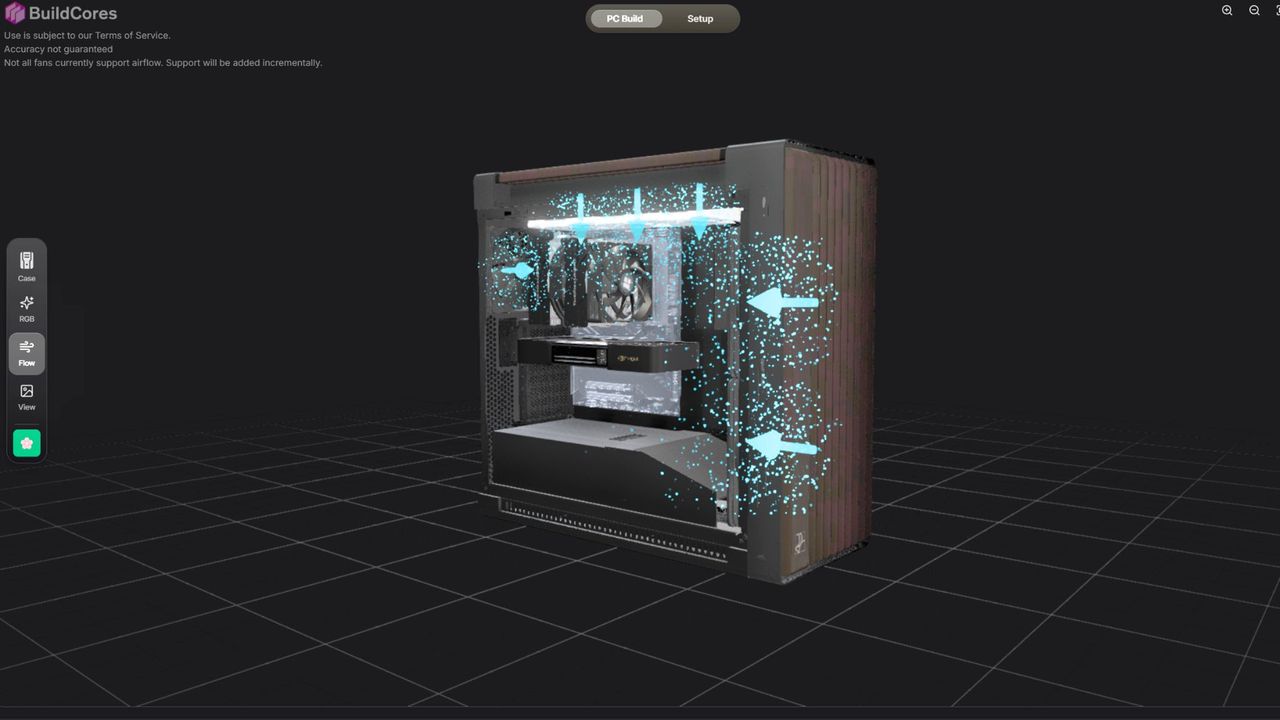
Proper airflow is the difference between a smooth-running machine and a desktop that feels like it’s breathing dusty, stagnant air directly onto your GPU. While achieving perfect thermal performance is difficult, a new feature from BuildCores offers a clever way to begin planning your next setup.
Recently highlighted on the PCMR subreddit, creator bosoxs202 demonstrated how this tool can be used to map out various hardware configurations. While it isn't a high-fidelity physics engine, it provides a helpful way to see the direction of your cooling components at a glance.
Visualizing Airflow with BuildCores
It is important to manage expectations regarding this airflow visualization: the tool is not a full-scale thermal simulation. It cannot calculate how a bulky GPU might obstruct a fan's path or how varying fan static pressure affects air movement. Instead, it acts as a visual guide for component orientation.
Addressing some community feedback, bosoxs202 clarified the tool's current scope: "I didn't mean to showcase this as a full airflow 'simulation'. It's basically a visual configurator that showcases the orientation of intake and exhaust fans to simplify it for beginners." The developer also noted that they are open to implementing more complex simulations in the future.
Building a $70,000 Dream PC
As an alternative to industry standards like PC Part Picker, BuildCores utilizes over 3,000 3D models to show exactly how components will sit within a chassis. To test the limits of the tool, I put together a massive, hypothetical build that reached approximately $70,000—featuring a single GPU and a monitor, but padded with extreme storage and high-end parts.
The platform is particularly useful for:
- Checking clearance: Seeing how fans might fit in unfamiliar cases.
- Planning orientation: Ensuring intake and exhaust fans are pointed the right way.
- Aesthetic planning: Visualizing how a completed build will look before buying.
While no amount of digital planning can prevent every possible building mistake, having a 3D model of a dream build is incredibly satisfying. In an era where memory costs can account for a massive portion of a total build price, it's fun to experiment with overkill components—like a 15 TB SSD—without the financial sting.