Figma Adds Code Layers, Support for Animations, More AI Features in New Update
Figma’s latest update is reshaping the way design and development teams work together, offering a range of new features that bring code, AI, and animation capabilities directly into the platform. This marks a major step forward in making Figma a more comprehensive tool for creative and technical collaboration.
Code Integration Becomes a Core Feature
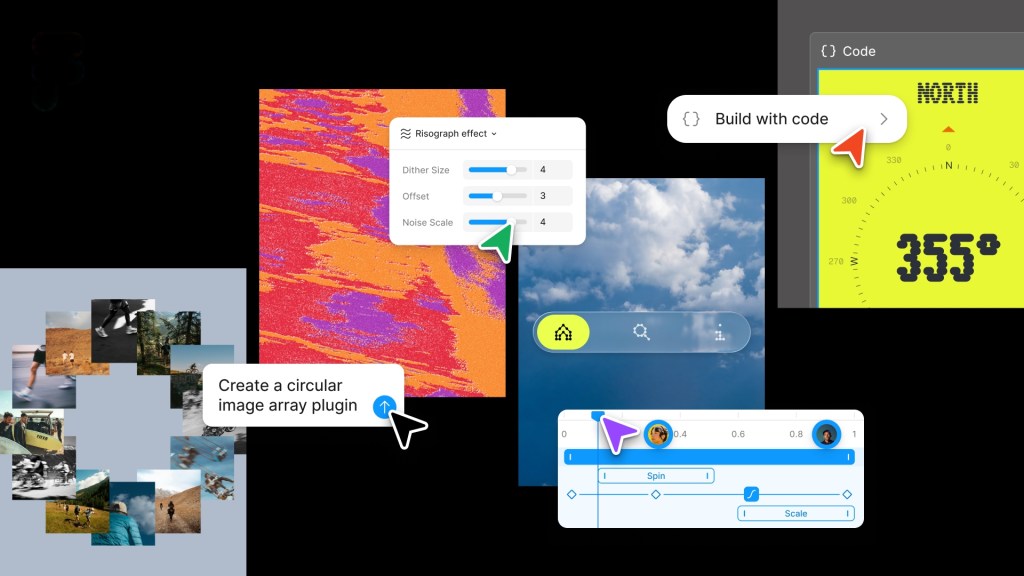
For the first time, Figma users can now embed code layers directly onto the collaborative canvas. This is a significant shift in the platform’s evolution, as it allows real-time iteration on code without the need for separate development environments. Teams can clone repositories, extract code flows, and test changes all within Figma, bridging the gap between design and engineering. The update isn’t just about convenience — it’s about creating a more inclusive design process where engineers and product managers can engage with design in real time.
AI Powers Custom Plugins and Enhanced Creativity
The new update also brings AI-driven plugin creation to the forefront, allowing users to build custom tools with simple prompts. Whether it's a layout generator or a vector path tracer, Figma's AI is now a co-creator in the design process. Users can train AI agents with text prompts to perform repeatable tasks, such as generating design assets or automating workflows. Additionally, integration with external tools like Notion, Excel, and GitHub provides more context for AI agents, making them more precise and context-aware.
- Custom plugin creation is now accessible through natural language prompts.
- Shader effects and fills can now be generated using AI.
- Weavy workflows will be integrated directly into Figma in a future update.
Animations and Transitions Get a Native Home
Designers no longer need to rely on third-party software to handle animations and transitions. Figma now supports motion and 3D transforms natively, allowing for richer, more dynamic prototypes. This change streamlines the design-to-development pipeline, reducing the need for back-and-forth between tools. The addition of shaders and transitions also gives designers more creative freedom, letting them experiment with visual effects in real time.
Figma’s approach to design and development is rapidly evolving. With these updates, the platform is positioning itself as a one-stop solution for cross-disciplinary teams. As the integration of code, AI, and motion design becomes more seamless, it’s clear that Figma isn’t just a design tool anymore — it’s becoming a full-stack creative environment. The future of design collaboration is not just visual; it’s interactive, intelligent, and increasingly code-centric.