I Was Roasted by a Physician for Sitting Weird but They Gave Me Some Great Tips for Healthier Gaming
I remember the stigma attached to gaming chairs even 10 years ago. The general consensus among many was that they were all style over substance. Browse most major retailers, and you're sure to find some specimens even today—many of which leave ergonomics to the imagination. That’s gradually changing, as is the science behind sitting. I recently had a chance to speak to Dr. Lindsey Migliore, a physician working in esports medicine, to find out from someone who knows a thing or two about it.
Dr. Migliore wrote a book about esports health and founded a consultancy on the topic, GamerDoc, in 2020. She’s also teamed up with Herman Miller and Secretlab, acting as an ergonomic advisor to the gaming chair company. That’s where I met Dr. Migliore, at Secretlab’s HQ in Singapore—everyone calls her Dr. Lindsey.
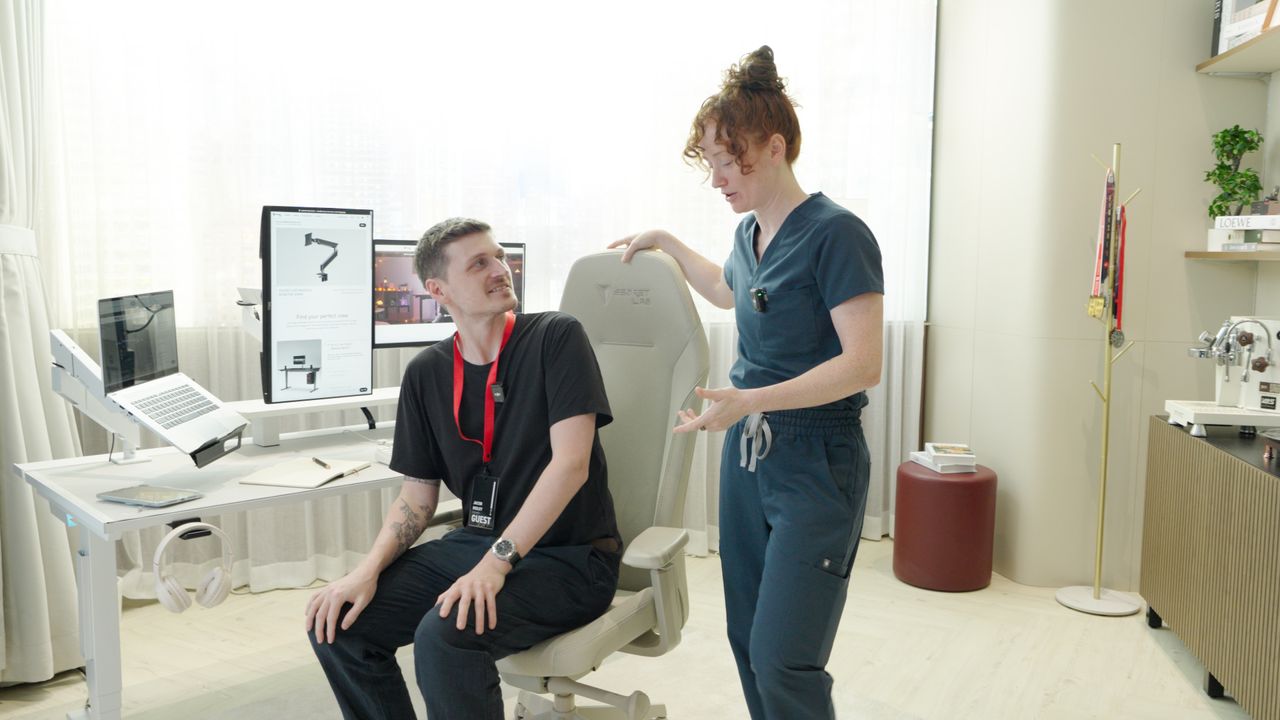
I offered to show Dr. Lindsey my own sitting position, which I sheepishly admit is absolutely dreadful. I hunch forward. I don’t mean to, but I catch myself gradually moving toward the screen throughout the day. Maybe it’s my eyesight—that’s what I tell the doc, anyway—but it doesn’t protect me from the savaging yet to come.
Dr. Lindsey had a lot to say about my sitting position. Little of it was good. Even besides my persistent and problematic hunching, my feet aren't always flat on the floor, and I don’t use my standing desk as often as I should. I’m a great example of what not to do.
Dr. Lindsey judges my posture and quickly—maybe too quickly—suggests I suffer from lower back pain in the morning. It’s actually an ongoing issue, and now I’m sat in front of a physician who accurately diagnosed the issue in seconds. I start to wonder if I've entirely created it through my own awful posture.
"Starting to catch up on you a little bit?" Dr. Lindsey says as I hunch over the desk in the Secretlab showroom. "Back pain in the morning? Can't touch your toes?"
Dr. Lindsey is correct about the back pain. Though I can touch my toes because I do yoga, which I quickly interject to try to make it appear that I’m not a complete and utter gremlin. Thankfully, this isn't merely an exercise in mocking me. The doc goes through some steps to better fit the chair to my body and support me throughout the day, which you may find useful in your own quest for better posture and a longer shelf life behind a desk.
Key Tips for Better Posture While Gaming
Dr. Lindsey Migliore emphasizes that feet flat on the floor is the number one most important thing. "When you adjust the seat depth, you want two to three finger breadths behind your knee and the chair," she says. This means, when sitting upright with your feet flat on the floor, extend two or three fingers together on one hand and slot them between the end of the seat and the inside of your knee. If you can fit your fingers there, but no more, you’re in a good position. If not, adjust the seat depth.
"So you want your low back flat against this," Dr. Lindsey says, tapping the lumbar section of the backrest. I’m sat in Secretlab’s new Atlas chair, which Dr. Lindsey has been brought in to speak about, but this advice works for anything with a reasonable attention to ergonomics.
We move onto armrests, which I’m thankfully no longer required to demonstrate. Dr. Lindsey is surprisingly easygoing when it comes to setting them to a preferred height for personal comfort.
"Some people put their armrest right at desk level, which is great because then you can sit like this," Dr. Lindsey says, sitting with her arms across the armrests and atop the desk. "I put them a little bit below, and then raise my desk up so I can get more close and use kind of more the desk as my armrests."
"So the arm is usually at about the level of the desk, but it's more personal preference. You just want your wrist to be neutral." A neutral wrist, which is a focus of ergonomic keyboards and mice, is to reduce the risk of carpal tunnel syndrome. With a neutral wrist position—the position they'd take if you loosely hang your hands by your sides—the pressure is relieved from your carpal tunnel, which sits between the two bones extending toward the hand.
The monitors should be an arm's length away, and then the top of the monitor should be at or just below eye level.
Dr. Lindsey Migliore says, "Any extension, or flexion, the pressure on the nerve that runs through there skyrockets, and that's what causes compression over time. So you want to keep your wrists in neutral, and that's really what the armrests do, and kind of offload the weight on the forearms a little bit." A desk that can be adjusted to your height is a handy thing to have, Dr. Lindsey admits, but suggests you can get by with stacking books under the legs as she once did.
"So when you're at the desk, the desk is going to move to you so your elbows are at 90 (degrees), and then the monitors should be an arm's length away, and then the top of the monitor should be at or just below eye level."
A lot of this is the ideal posture, which Dr. Lindsey is keen to point out is only half the battle. Sitting upright is good, but movement is key. I can hunch, if only for a bit, so long as I mix up my sitting position shortly thereafter. I should aim for good posture, but I should also aim for lots of postures throughout the day.
"Ergonomics isn't just physical anymore. It's got to be behavioral. It's got to be something that makes it easy for you to move."
Life's not a video game where we get to choose another character. We are stuck in this.
Dr. Lindsey Migliore says, "When I started working, it was like the 90-90-90 rule, which was stiff, upright elbows." She demonstrates an upright seating position. "The perfect posture."
"And then we started applying it more to office workers and how we all kind of sit in the..."