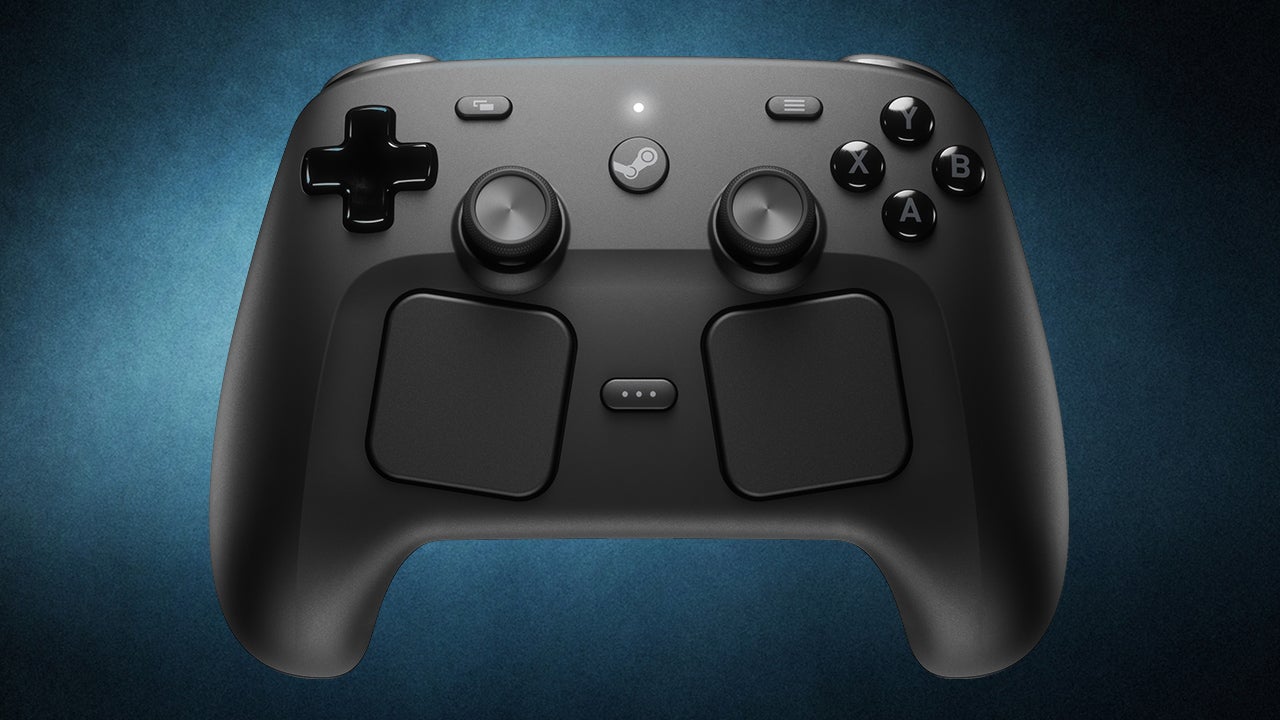
It has been more than 10 years since Valve released the original Steam Controller, a gamepad designed specifically for PC gaming that ultimately found only a small cult following. Its most innovative feature—haptic touchpads intended to provide detailed mouse pointer control—was also its most polarizing, as replacing standard thumbsticks turned off players seeking a traditional experience. While the original failed, its innovations paved the way for the excellent Steam Deck.
The success of the Steam Deck has led to a new wave of Valve hardware, including the forthcoming Steam Machine, Steam Frame, and this new controller. In this Steam Controller Review, I will share how, after two weeks of testing, this device has quickly become my favorite controller for PC gaming.
Design and Ergonomics
The new Steam Controller looks familiar to anyone who uses a Steam Deck, though it feels odd compared to a default Xbox controller. It utilizes a standard shape with a symmetrical dual-thumbstick layout most similar to the base PS5 controller. The ABXY face buttons and D-pad also mimic the PS5 layout, though they are positioned slightly more in-line with the thumbsticks.
The build quality is impressive:
- Face Buttons: These feel solid and offer a satisfying press without any instability or rattle, even if they aren't particularly clicky.
- D-pad: It features nice travel without feeling mushy, making it perfectly serviceable for platforming in Hollow Knight: Silksong, though it lacks the definition needed for fighting game inputs like quarter-circles.
- Triggers and Bumpers: The bumpers are sturdy, while the triggers feature a comfortable lip and travel distance.
While there are no physical trigger stops to adjust the actuation point, you can use Steam Input to change them to activate on a slight pull or assign separate actions to soft vs. full pulls. Additionally, the rear buttons (R5 and L5) sit right under your middle and ring fingers. They are easy to press, though I did find that R5 and L5 can occasionally trigger accidentally if you rest your hands on your leg in a certain way while crossing your legs.
Advanced Tech: TMR Sensors and Capacitive Sticks
A major highlight of this Steam Controller Review is the technology found in the analog sticks. These excellent sticks feature a shallow concave top and a rubberized lip for comfort. Unlike most controllers, these sticks have capacitive touch capability, meaning they can detect if your thumbs are touching them to toggle advanced features like gyroscopic controls.
Under the hood, the sticks use Tunnel Magnetoresistance (TMR) sensors. This technology uses magnets to achieve:
- A higher polling rate.
- Lower power consumption.
- Greater precision than traditional or Hall-effect sticks.
Most importantly, TMR sensors are virtually immune to stick drift because there is no physical component that wears down over time, meaning the controller should last years before the sticks degrade.
The Return of the Touchpads
Below the thumbsticks sits the Steam Controller’s most unique feature: a pair of large square touchpads similar to those on the Steam Deck. These pads are capacitive and offer pleasing haptic feedback. Through Steam Input, you can customize them to mimic four directional buttons, a radial wheel, or various complex control schemes downloaded from the Steam community.
While I adore the Steam Deck, I rarely use its touchpads for gaming, preferring not to navigate complicated menus. My experience with the Steam Controller’s touchpads was similar; while testing Crusader Kings 3 and Against the Storm, I found the experience inefficient and frustrating despite using community profiles. However, they are a fantastic "nice-to-have" feature for controlling the Windows, Mac, or Linux desktop when you don't want to reach for a mouse and keyboard during couch gaming.
Front Interface and Navigation
Rounding out the front of the controller are four essential buttons:
- View Button: Located on the left.
- Menu Button: Located on the right.
- Quick Access Menu: Situated below, between the trackpads.
- Steam Button: Dead center.
The central Steam button is highly versatile, featuring a variety of functions that cascade depending on whether the next step in the menu is already active or not.