Best MacBook Accessories (2026): Chargers, Covers, Keyboards, and More
The coffee shop hums with the low murmur of remote workers, but at the corner table, a MacBook Pro sits closed inside a sleek Native Union sleeve, its aluminum chassis protected and ready for the next session. This is the modern reality: the laptop has transcended being just a computer to become a mobile command center that demands specialized gear to fulfill its potential. In 2026, finding the Best MacBook Accessories is no longer optional; it is essential for transforming Apple's elegant but fragile design into a durable, efficient workstation. While Apple crafts machines of undeniable elegance, their minimalist language often sacrifices practicality in favor of thinness, leaving users vulnerable to scratches and limited by port scarcity. The ecosystem surrounding these devices has evolved into a critical component of the user experience, ensuring your investment lasts through years of daily use.
Defense Against the Elements: Cases, Skins, and Sleeves
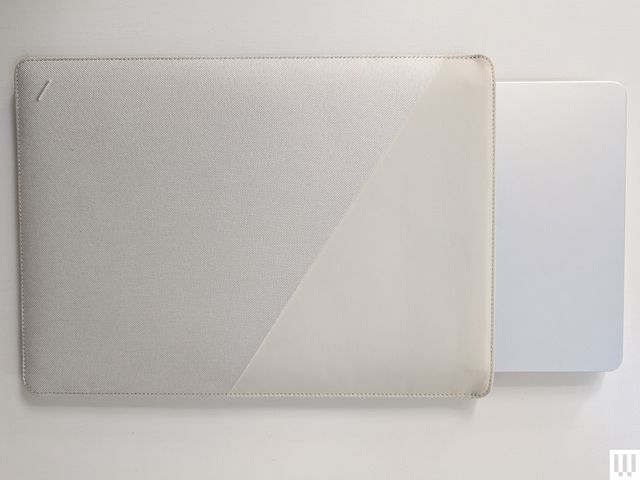
The most immediate concern for any MacBook owner is physical protection without sacrificing the device's signature portability. The market in 2026 has shifted from bulkier, generic cases to precision-engineered solutions that respect the laptop's thin profile while offering robust defense. For those who prioritize a slim carry, the Native Union Stow Slim Laptop Sleeve stands out as a benchmark for minimalism. It offers magnetic closure and an exterior pocket for cables, ensuring the MacBook remains secure without adding unnecessary bulk to a backpack or messenger bag.
Conversely, users seeking rugged defense without the weight penalty of a hard-shell case often turn to adhesive skins. The dbrand MacBook Skin provides a textured, high-end finish that resists fingerprints and minor scratches while maintaining the device's sleek aesthetic. Unlike traditional cases that can trap heat, these skins are ultra-thin and allow for full ventilation, making them ideal for the lightweight MacBook Air or those who refuse to compromise on feel.
Key options for protection include:
- Native Union Stow Slim Sleeve: Features a magnetic closure and exterior pocket, perfect for minimalist carry.
- dbrand Customizable Skins: Available in dozens of textures and colors, offering protection without added weight.
- Incase Hardshell Case: Provides maximum impact protection with precise port cutouts and rubberized feet, though it does add significant heft.
For the commuter who carries their machine daily, a dedicated backpack like the Bellroy Via Workpack offers a secure home for the MacBook alongside essential peripherals. Its compact design includes an interior water bottle holder and grab handles, making it versatile enough for short trips where only the basics are required. The synergy between a protective sleeve or skin and a well-organized bag ensures that the investment in the laptop itself is preserved through years of daily use.
Ergonomics and Input: Stands, Keyboards, and Mice
The sleek design of a MacBook becomes a liability when used for extended periods on a desk; the screen sits too low, forcing an unnatural neck angle, and the keyboard lacks the tactile feedback many power users crave. Elevating the device is the first step toward a sustainable workspace, and the Native Union Desk Laptop Stand has emerged as the premier solution in this category. Its combination of aluminum construction and fabric detailing not only supports the machine at an ergonomic height but also adds a layer of visual warmth to any desk setup.
When it comes to input, the built-in trackpad remains industry-leading for precision, yet many professionals prefer a dedicated mouse for navigation-heavy tasks or extensive design work. The Logitech MX Master 4 has cemented its status as the go-to companion for serious MacBook users in 2026, offering an ergonomic shape and a precise sensor that rivals even the most expensive competitors. Its customizable buttons and scroll wheel allow for workflow acceleration that a trackpad simply cannot match.
For those who find themselves typing for hours away from the laptop, external keyboards bridge the gap between the Apple experience and mechanical satisfaction. The Keychron B2 Pro strikes a delicate balance, utilizing a scissor-switch mechanism that mimics the MacBook's feel while introducing superior customization options through its launcher software. This device proves that one does not need to sacrifice the familiar click of an Apple keyboard to gain the benefits of external input devices.
Top picks for ergonomic upgrades include:
- Native Union Desk Stand: Elevates the screen for better posture with a premium fabric and aluminum build.
- Logitech MX Master 4 Mouse: The ergonomic standard for high-productivity workflows, perfect when paired with a stand.
- Keychron B2 Pro Keyboard: A scissor-switch alternative that offers deep customization without losing the tactile Apple feel.
Power and Peripherals: Charging and Display Solutions
The limitations of modern MacBook connectivity often require users to expand their capabilities through external displays and high-efficiency charging solutions. Apple's reliance on USB-C means that a single port must handle data, video output, and power delivery simultaneously, creating bottlenecks for heavy workloads in 2026. A 4K Monitor like the Dell 27 Plus S2725QS is essential for those who need screen real estate without breaking the bank, offering sharp resolution and a clean aesthetic that complements Apple hardware.
For users with power-hungry MacBook Pros, especially under load during rendering or gaming sessions, standard charging bricks can fall short. The Satechi 108-Watt USB-C Wall Charger addresses this need by delivering ample power to the laptop while simultaneously charging other devices through its three ports. This flexibility is crucial for travelers and professionals who rely on a single wall outlet to keep their entire mobile ecosystem running.
In scenarios where portability is paramount, the Nomad 65W Slim Power Adapter redefines what a charger can be. Its shockingly thin profile fits easily into any pocket or bag, yet it delivers enough juice to fully charge a MacBook on the go. By integrating these accessories, you ensure that your device remains productive and protected regardless of where your work takes you.