There is a palpable sense of disappointment lingering in the technosphere right now. It hangs in the back of your mind like unkempt cable management, a quiet frustration that has grown louder as journalists and power users alike call out the enshittification of PC gaming. I am certainly not the first to voice this, but for me, the breaking point arrived in January. After decades of loyalty, I finally sacked off the legendary Windows operating system entirely in favor of Pop! OS.
This is a massive shift for someone with my history. I’ve been using Windows since around 1998. At just seven years old, it was my first gateway into the world of PC gaming. From Win 98 to modern-era Windows 11, navigating Microsoft’s evolving ecosystem has defined my career. I’ve gamed for countless hours, built complex UIs and websites, finished my degree, and relied on it to become the editor of Maximum PC. Yet, despite my colleagues’ persistent efforts to push me toward open-source, I refused. That changed when the frustration outweighed the familiarity.
Why I Left Windows Behind
Modern-day Windows has become increasingly difficult to ignore for the wrong reasons. You pay a premium for an official license, expecting a clean, fast, and stable experience. Instead, users are met with a degraded environment that feels like it is actively working against them. The issues are multifaceted:
- Intrusive Telemetry: Back-end services constantly ping Microsoft’s servers, tracking your usage habits in a way that feels invasive rather than helpful.
- Aggressive AI Integration: The push for Copilot often feels less like assistance and more like data harvesting, raising questions about what personal information is being processed.
- Ad-Driven Disruption: The OS is rife with prompts to sign up for Microsoft 365, Teams, or even third-party apps like Candy Crush, breaking your workflow.
- Unpredictable Updates: The relentless stream of Windows Updates can feel like they are rammed down your throat, with the potential to brick a rig at any moment.
After 28 years, the decision to leave was not made lightly. It was a necessary step to reclaim control over my computing environment.
Enter Pop! OS: The Middle Ground
Linux has evolved significantly. Today, there are distros dedicated to gaming, privacy, and specific hardware compatibility, built to minimize the friction often faced by Windows refugees. You no longer need to spend hours in a terminal pretending to live in 1988.
I chose Pop! OS because it strikes a vital balance. It is mature, stable, and features the beautiful Cosmic UI. With the normalization of Proton via the Steam Deck, gaming on Linux has become smoother than ever. It offers a hand-holding approach that makes the transition from Windows far less daunting.
Setting Up Dual Boot
You don’t need to fry your existing Windows installation to test the waters. A dual boot setup allows you to dabble with both OSs. Here is how to do it safely:
- Backup and Prepare: Ensure Windows is fully up-to-date and back up mission-critical data.
- Choose the Right ISO: Visit system76.com/pop/download/. If you have an AMD GPU, use the standard Pop!_OS 24.04 LTS. If you have an NVIDIA GPU (GTX 16 series or higher), grab the variant with NVIDIA drivers.
- Create Bootable Media: Use Rufus to flash the ISO onto an 8 GB USB stick (note: this will be wiped).
- Partition Your Drive: In Windows Disk Management, shrink a partition by at least 250 GB. Leave it unformatted (Pop! OS uses ext4, not NTFS).
- Configure BIOS: Disable Fast Startup and BitLocker. Change Secure Boot to "Other OS".
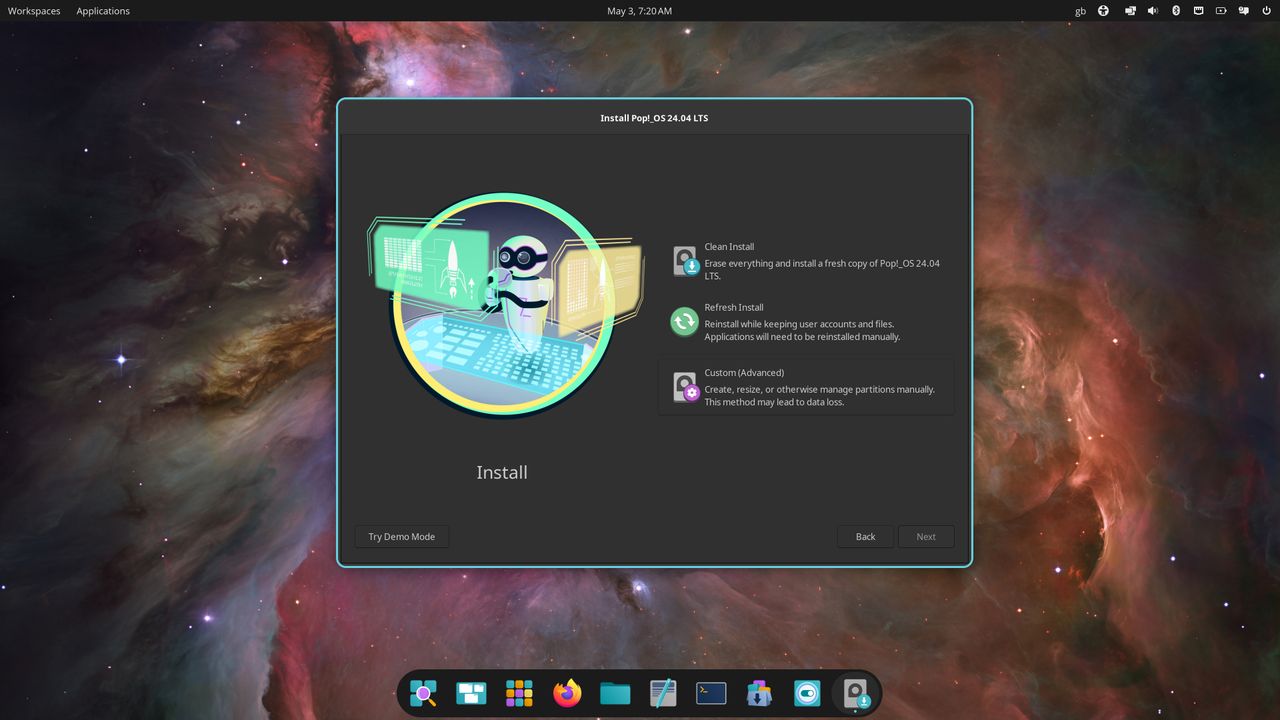
- Install: Boot from the USB, select Custom Install, and create a partition from your unallocated space.
- Finalize: Once logged in, open the Terminal (Windows key + t) and run: sudo apt update && sudo apt full-upgrade -y This ensures your system and drivers are fully updated.
Life on Pop! OS: A Breath of Fresh Air
Using Pop! OS feels like a breath of fresh air. The experience is clean, responsive, and low-latency, making the transition from Windows feel jarring in reverse.
The performance difference is uncanny. Even on high-end hardware like a Ryzen 9 9900X and RTX 5080, switching back to Windows for work can make the system feel laggy by comparison. The mouse movement, the responsiveness of applications, and the overall fluidity of the Cosmic desktop environment highlight how much bloat and overhead Windows has accumulated over decades.
For a long-time Microsoft loyalist, this isn't just about switching OSs; it's about reclaiming the joy and efficiency of computing. Pop! OS has not just been a viable alternative; it has been a revelation, proving that the open-source path is no longer a niche hobby, but a powerful, mature choice for the modern gamer and professional.