PC enthusiasts might feel that Microsoft has been slowly stripping customisation control options out of Windows, but the truth is they haven't actually gone. They have simply been moved into a separate piece of software called PowerToys. If you are the type of user managing multiple large screens, Microsoft's latest PowerToys tool is an absolute must-have for your setup.
You can grab version v0.99.1 of PowerToys from its dedicated GitHub page. While this specific update focuses on fixing a variety of bugs, it was the previous v0.99 release that introduced the standout features discussed here.
New Features in Microsoft's Latest PowerToys Tool
Two specific features stand out in the recent updates: Grab and Move and Power Display. The Grab and Move tool allows you to grab a window and resize it without ever having to "select" or focus on the window itself.
This is incredibly useful if a window is partially obscured by others. You can interact with it "through" the windows in front, which is much more convenient than using Alt-Tab when managing multiple large monitors. Notably, Grab and Move does not change the window's depth order; it stays exactly where it is in the stack.
Mastering Your Setup with Power Display
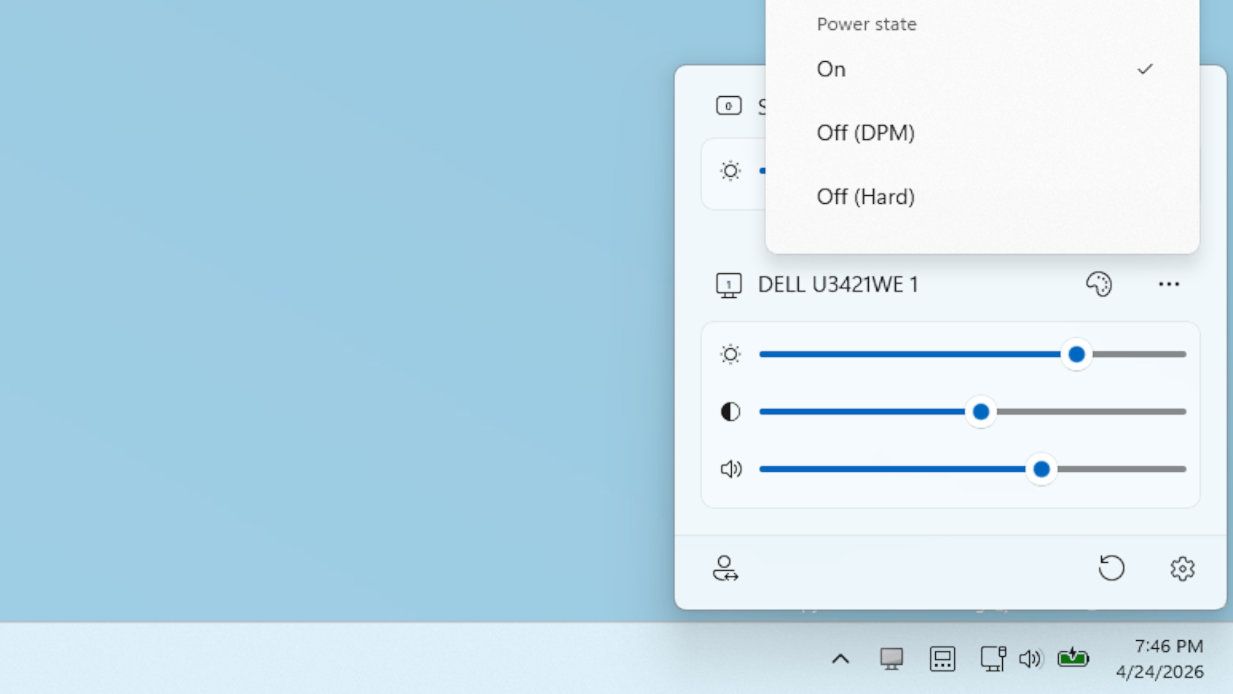
The Power Display feature brings essential monitor controls directly to your desktop. The utility of Microsoft's latest PowerToys tool extends to these hardware-level adjustments, eliminating the need to fiddle with a monitor's physical On-Screen Display (OSD).
Depending on your configuration, you can manage several settings:
- Brightness and contrast levels
- Audio volume
- Input switching
- Monitor power states
While Microsoft provides an advisory warning that changing these settings might cause issues, the functionality is a blessing for power users. You can even set up multiple profiles to switch between instantly—for example, dimming your screens for focused work and brightening them for high-intensity gaming.
Neither feature is what you would call revolutionary, and Linux users may feel that Microsoft is playing catch-up. However, the regular updates to the app ensure there are always new gadgets to play around with. Using Microsoft's latest PowerToys tool makes wrangling a scattered collection of windows much more manageable.