Pearl Abyss recently released patch 1.03.00, and while it may have flown under the radar, Crimson Desert's new camera settings are a massive addition to the open-world RPG. Rather than just minor tweaks, the developer has introduced an array of sliders within the accessibility menu, letting players dictate exactly how they view the world.
Achieving a Baldur's Gate 3 Perspective
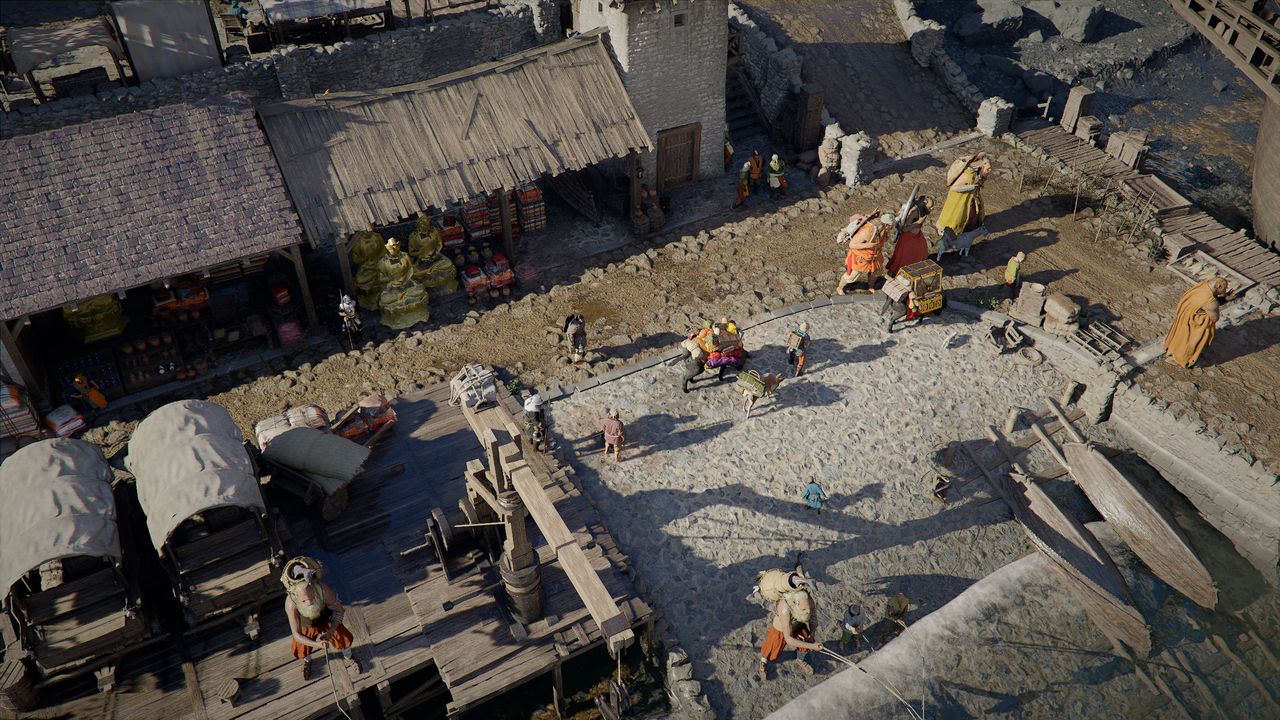
A recent tweet from Ninjago highlighted a perspective I didn't know was possible in the title. By utilizing these settings, you can achieve an almost isometric, top-down view similar to Diablo or Baldur's Gate 3. While the game's photomode allows for similar static shots, this is happening during live gameplay.
Experimenting with Crimson Desert's New Camera Settings
To be clear, Pearl Abyss hasn't actually added "Diablo-style gameplay." The core mechanics and combat systems remain untouched; it is strictly a matter of visual customization. Even so, the ability to use Crimson Desert's new camera settings to stroll through the world from a high vantage point is incredibly enjoyable.
How to Access the New Sliders
If you want to try this out, navigate to the "Others" section of the menu and select "Accessibility." You will find several new sliders available for adjustment:
- Camera Visual Range
- Camera Distance
- Camera Vertical Offset
- Camera Horizontal Offset
Tips for the Perfect View
The easiest way to achieve the effect is to crank all these sliders up to 100%, though you should play around with them to find your ideal setup. Just a heads-up: the camera will automatically zoom in on Kliff if an object like a building or structure blocks the view, so the isometric feel won't be perfectly consistent near large obstacles.