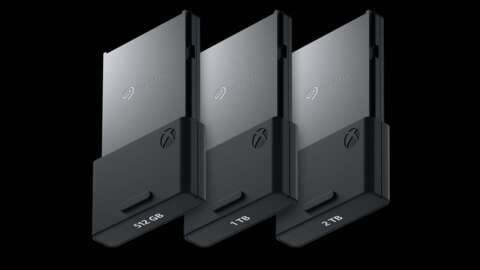
With the ongoing AI boom driving up the cost of fast storage, finding ways to repurpose existing hardware has never been more important. Fortunately, a recently discovered method allows you to turn your Xbox Expansion Card into a functional SSD for your PC, offering a potential way to save money on much-needed storage upgrades.
Understanding the Xbox Expansion Card Technology
The small form factor SSDs manufactured by Microsoft and Seagate for the Xbox Series X|S are not actually proprietary. Instead, they utilize the CFexpress format, a technology that has been widely used in professional digital cameras for some time.
Because this format is common outside of the Xbox ecosystem, there is a wide variety of compatible adapters available for PC users. While not every adapter is compatible, a Reddit user recently identified a specific solution to bridge the gap between console storage and desktop computing.
What You Need for the Setup
To successfully repurpose your hardware, you will need a few specific components:
- An existing Xbox Expansion Card
- A PCIe-to-CFexpress adapter
- An available PCIe slot on your motherboard
Performance Expectations for Your PC SSD
The setup process is remarkably straightforward. Once the adapter is plugged into one of your motherboard's PCIe ports, your PC should immediately recognize the device as a new, usable SSD.
While the speeds are not incredibly high due to the limited bandwidth of the adapter, the performance is still significantly faster than a traditional SATA hard drive. This makes it a much more viable option for modern computing needs.
Is It Good Enough for Gaming?
Even with the slight speed limitations, this repurposed Xbox Expansion Card is perfect for standard gaming use. Whether you are using the drive as extra storage for your library or running games directly from the device, it provides a much-needed boost to your storage capacity. If you are looking to expand your storage without the high price tag of new NVMe drives, this is an excellent workaround.