The Hidden Danger: Why Your Steam Controller’s Charging Puck is Always Live
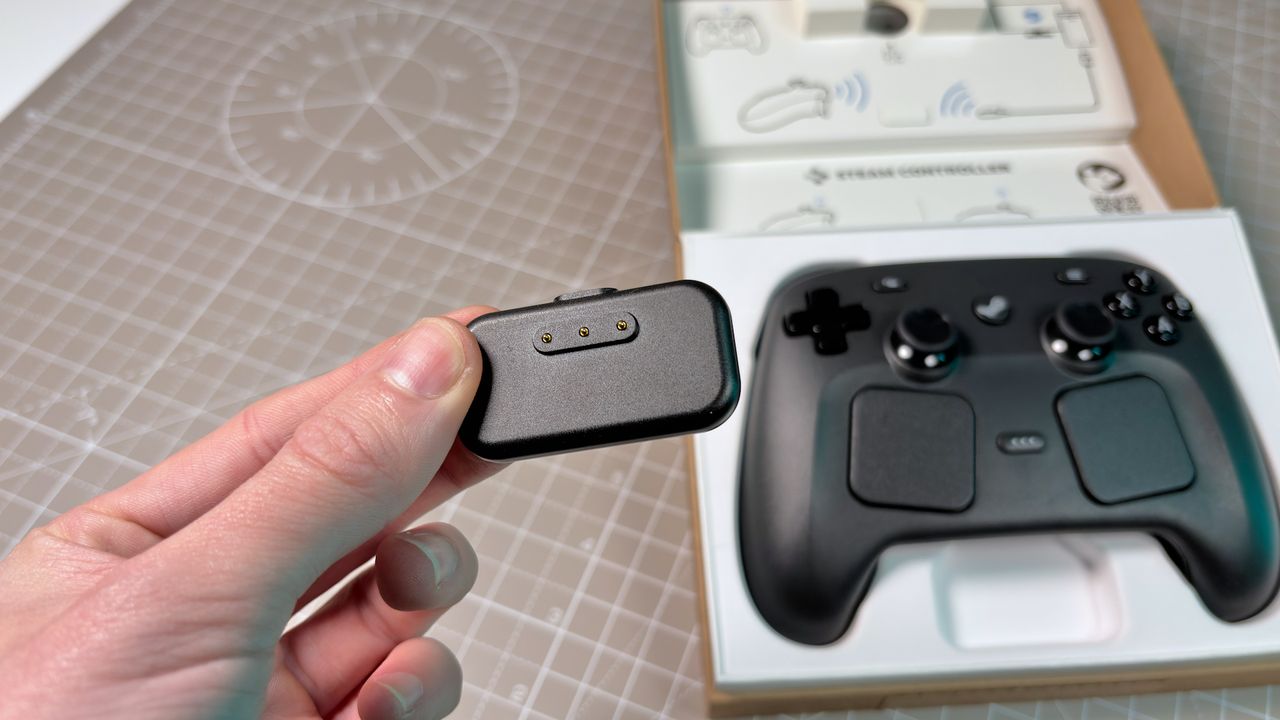
Valve’s Steam Controller remains a niche but beloved piece of gaming hardware, praised for its innovative touchpads and ergonomic design. While the device itself is a marvel of engineering, its accompanying charging puck harbors a potentially hazardous secret that many users overlook: the exposed metal contacts remain electrically active even when no controller is present.
This constant "live" state means that accidental contact with conductive materials can lead to painful shocks, short circuits, or even minor burns. As recent discoveries have shown, treating the charging dock as a passive, inert object is a mistake that could result in damage to your accessories or personal injury.
Real-World Risks of Accidental Contact
The issue came to light after a Reddit user, known as Toikka, experienced a startling incident involving the Steam Controller’s charging puck. Upon accidentally letting the metal clasp of a magnetically-latching smartwatch band touch the exposed pins, the user witnessed the strap begin to sizzle due to a short circuit.
Because the watch band was entirely metal-based, it acted as a conductor for the current flowing through the puck’s pins. This resulted in:
- Immediate electrical shock to the wearer.
- Damage to the smartwatch band from the heat generated by the short circuit.
- A potential fire hazard, as the user noted the incident "almost started a fire."
This isn’t just a quirk of Valve’s design. The same risk exists with other modern controllers, such as the 8BitDo Ultimate 2. Testing with a multimeter confirms that the charging docks for these devices maintain a constant voltage across their exposed pins, regardless of whether a controller is seated in them.
Why Do Manufacturers Do This?
It may seem counterintuitive for a company to design a charger with exposed, live contacts, but the reason is primarily economic. Creating a "sense pin" mechanism—where the charger only activates when it detects a controller—is a more complex and costly engineering solution.
Valve and similar manufacturers opt for a simple, low-cost design to offset the high material costs of the controllers themselves. This approach is functionally normal for budget-friendly hardware, but it shifts the burden of safety entirely onto the user.
An ideal, safer design would include a grounding sense pin, similar to those found in Nvidia’s 12VHPWR power connectors for RTX graphics cards. In such a system, the charging pins would only become live after the sense pin is grounded by the device, ensuring that no current flows unless a compatible controller is properly connected.
How to Stay Safe
Given the current state of these charging docks, users must take proactive steps to prevent accidents. The risk is real, especially for those who wear metallic smartwatch bands or have other conductive jewelry nearby.
To mitigate the risk of electrical shock or damage to your devices:
- Keep the puck out of reach of conductive materials when not in use.
- Never place metallic items (like watch straps, keys, or coins) near the exposed pins.
- Unplug the charger when it is not actively charging a controller. This is the only way to ensure the pins are truly dead.
- Store the controller in its case if possible, to prevent accidental contact with the puck’s pins.
The Need for Better Warnings
Despite the potential for harm, there is little to no warning regarding this issue in official documentation or on manufacturer websites. While Valve may include a small disclaimer in the manual, it is often overlooked by users who assume charging docks are safe by default.
In an era where consumer safety and liability are heavily scrutinized, clearer warnings about the live nature of these charging contacts are long overdue. Without explicit instructions to unplug the device or keep conductive materials away, users are left vulnerable to surprises like sizzling watch bands.
Until manufacturers redesign their charging docks to include safety features like sense pins, the onus remains on the user. Treat the Steam Controller’s charging puck with the same caution you would apply to any exposed electrical component, and ensure it is unplugged when not in active use.