Finally, a Great Free Radio App for Windows
The silence of the Windows taskbar has long been a design oversight. For years, the operating system’s system tray—a cramped real estate reserved for essential background processes—has lacked a native, elegant solution for ambient audio. While macOS has seen the rise of dedicated, minimal UI applications like Eter that respect this space, Windows users were left with browser tabs that cluttered the interface or heavy, ad-laden streaming clients that demanded constant attention.
The barrier to entry for listening to curated internet radio was never technical; it was experiential. It required a tolerance for digital clutter. That friction has finally been addressed by Trdo, a free, open-source application that treats internet radio not as a secondary feature, but as a first-class citizen of the Windows desktop. By integrating a robust station discovery engine directly into the system tray, Trdo bridges the gap between the algorithmic determinism of major streaming services and the serendipitous nature of traditional broadcast radio.
The Architecture of Serendipity
The core philosophy behind Trdo is simplicity, but it does not sacrifice depth. Unlike commercial apps that force users into curated playlists, Trdo functions as a conduit for the vast, decentralized world of internet radio. It does not come pre-loaded with stations. This might seem like a hurdle, but it is a deliberate design choice that empowers the user to curate their own auditory landscape without corporate interference.
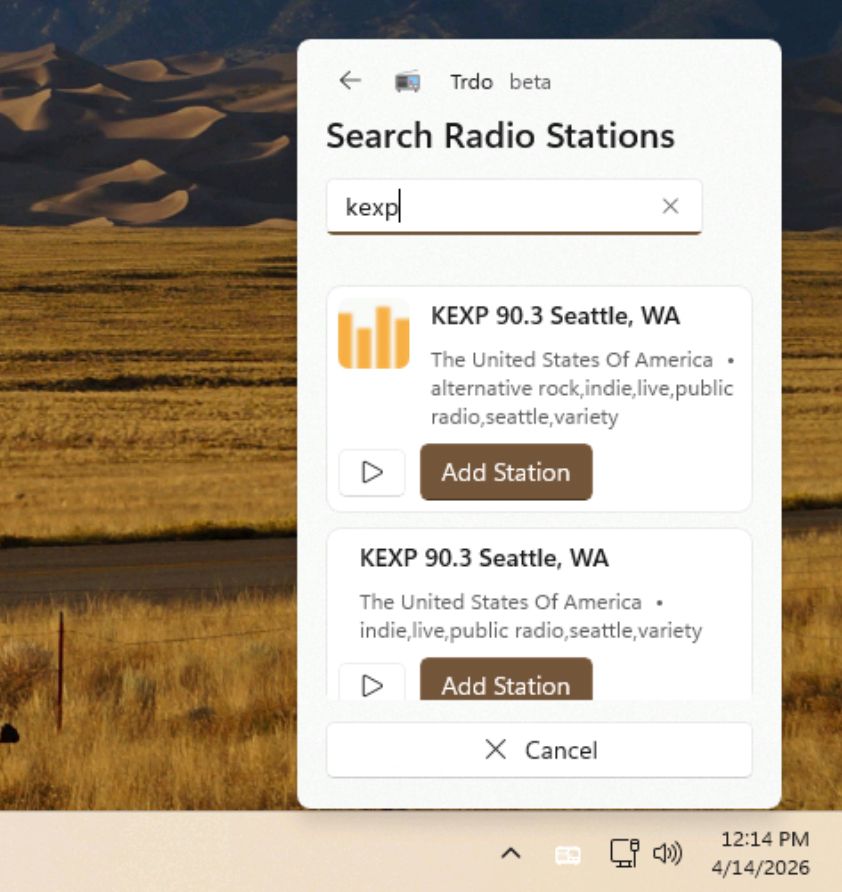
The application relies on the PLS file format, a standard playlist format used by many radio broadcasters to deliver streams. Trdo’s built-in search tool scans a vast database to locate these PLS links, allowing users to add stations from across the globe. For those who prefer manual curation or cannot find a station via search, the app supports the direct import of streaming URLs.
This flexibility is crucial for niche listeners. Whether one is tuning into KEXP’s indie rock coverage, SomaFM’s ambient electronic streams, or a local public radio station in a country of interest, Trdo accommodates the long-tail nature of radio broadcasting. The search engine is robust enough to handle obscure endpoints, while the manual input field serves as a safety net for stations that have not yet indexed their streams in public databases.
Interface and Interaction Design
Trdo’s interaction model is defined by its proximity to the system clock. The primary interface is invisible until needed, appearing only when the user interacts with the tray icon. This minimizes cognitive load. A left-click (by default) toggles play and pause, while a right-click opens the main window. The default settings prioritize quick access to playback controls, though users can reverse these actions in the settings menu to match their muscle memory.
The application includes a comprehensive history log, tracking every song played during a listening session. This feature addresses one of the most common frustrations of radio listening: the inability to identify a track heard minutes prior. The history list allows users to scroll back and identify songs, with optional deep links to Spotify, Discogs, Apple Music, and YouTube Music. These links can be toggled on or off depending on the user’s preferred ecosystem.
However, the interaction design is not without its shortcomings. The current iteration does not support changing tracks using the Next or Previous buttons on multimedia keyboards. This is a significant oversight for users who rely on physical controls for seamless navigation. The app remains stuck on the current station until manually switched, breaking the flow of a listening session.
Ecosystem Integration and Discovery
Trdo positions itself not as a replacement for streaming services, but as a complement to them. In an era where algorithmic recommendation engines dominate music discovery, internet radio offers a human-curated alternative. DJs and programmed shows often introduce listeners to genres and artists that would never appear in a personalized feed.
The app’s integration with external databases enhances this discovery process. By linking directly to Discogs or Apple Music, Trdo lowers the friction between hearing a song and owning or streaming it later. This creates a loop of discovery that is more organic than the typical "add to library" button found in commercial apps.
For users looking to expand their station library beyond the built-in search, external databases serve as valuable resources. Sites like Public Radio Fan and Internet Radio provide extensive lists of streaming links that can be imported directly into Trdo. This ecosystem approach ensures that the app remains relevant even as individual stations change their streaming providers or URLs.
The Verdict
Trdo represents a necessary correction to the Windows audio landscape. It offers a lightweight, privacy-respecting, and highly functional way to access the world’s radio stations without the bloat of traditional media players. While the lack of media key support for track switching is a notable limitation, the app’s focus on minimalism and discovery makes it an essential tool for power users.
For those tired of algorithmic feeds and browser clutter, Trdo provides a clear path back to the curated, human element of radio. It is a testament to what open-source software can achieve when it prioritizes user control over engagement metrics. The app is available for free via the Microsoft Store, making it an accessible upgrade for any Windows desktop.
Availability: Free via Microsoft Store Platform: Windows 10/11 Key Feature: System tray integration with minimal UI Limitation: No keyboard support for track switching